

Are you thinking about stepping away from content creation or taking a social media break? Have you ever wondered how to delete OnlyFans account and remove all your shared media? Before any action, it’s important to understand what happens next, especially if you’re a creator.
This guide will walk you through everything you need to know about how to deactivate OnlyFans account, delete it, and hide it.
How to Delete OnlyFans Account for Creators?
Many creators decide to leave the platform because they didn’t get the engagement or fanbase they hoped for. If you feel like you didn’t attract enough fans, sometimes the issue isn’t the quality of your content.
By refreshing your strategy and checking creative OnlyFans content ideas, you can grow your reach. But if you’re sure about leaving and ready to move on, here is how to delete OnlyFans account.
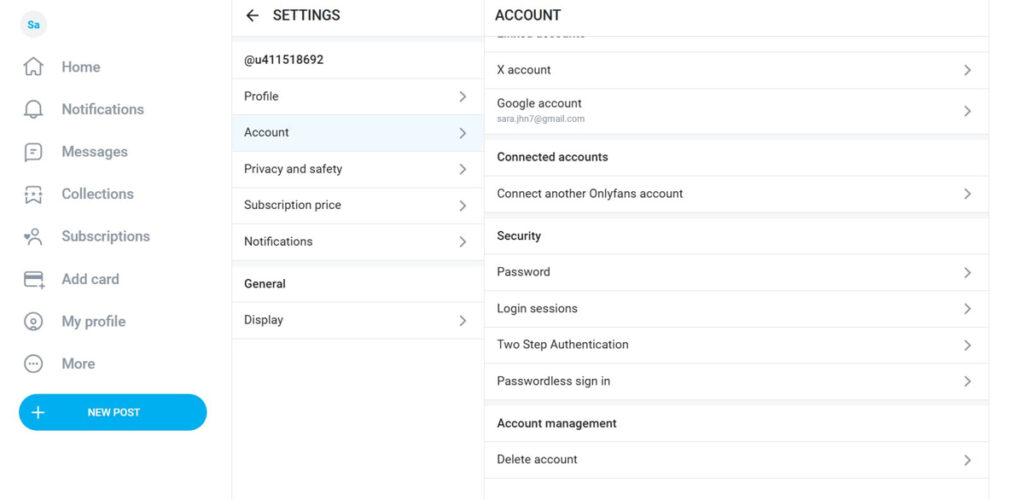
How To Delete OnlyFans On Desktop?
Even if you use OnlyFans on your phone, you can easily delete your account on a PC. Here is how to delete OnlyFans account on desktop:
- On your browser, search for the OnlyFans website and log in to your account.
- On the left toolbar, click on the ‘More’ option.
- Click on ‘Settings’.
- On the opened tab, click on ‘Account’.
- Scroll down and select ‘Delete Account’.
- Complete your action.
How To Delete An OnlyFans Account On iPhone/Android?
The process of deleting the OF account on different phone devices is pretty similar. Here is how to delete OnlyFans account on your phone:
- After logging in to your account, tap on your profile picture.
- Navigate to your ‘Settings’.
- Under the ‘Account’ section, select ‘Delete account’.
- Confirm your action, and you are done.
As a creator, your account will not be deleted until all your active subscriptions expire, which can last up to 30 days. Till that time, no subscriptions can be added to your account. Once the last paid subscription expires, your account will be deleted automatically, and you will receive a confirmation email.
How To Delete OnlyFans Account As A Fan?
If you use this platform to view content from your favorite creator but decide to leave the platform, here is what you need to do:
- Open your Instagram account and navigate to your profile.
- Go to your ‘Settings’ and find ‘Account’.
- Select ‘Delete Account’.
After confirming, your account and all its data will be automatically deleted immediately. You can also cancel your OnlyFans subscription and remove your card from the platform for more safety.
How To Deactivate OnlyFans Account?
Unfortunately, OnlyFans doesn’t provide a feature to temporarily deactivate your account. If you’re not ready to permanently delete your account, you can limit your activity and hide your profile instead. If You’re a Creator:
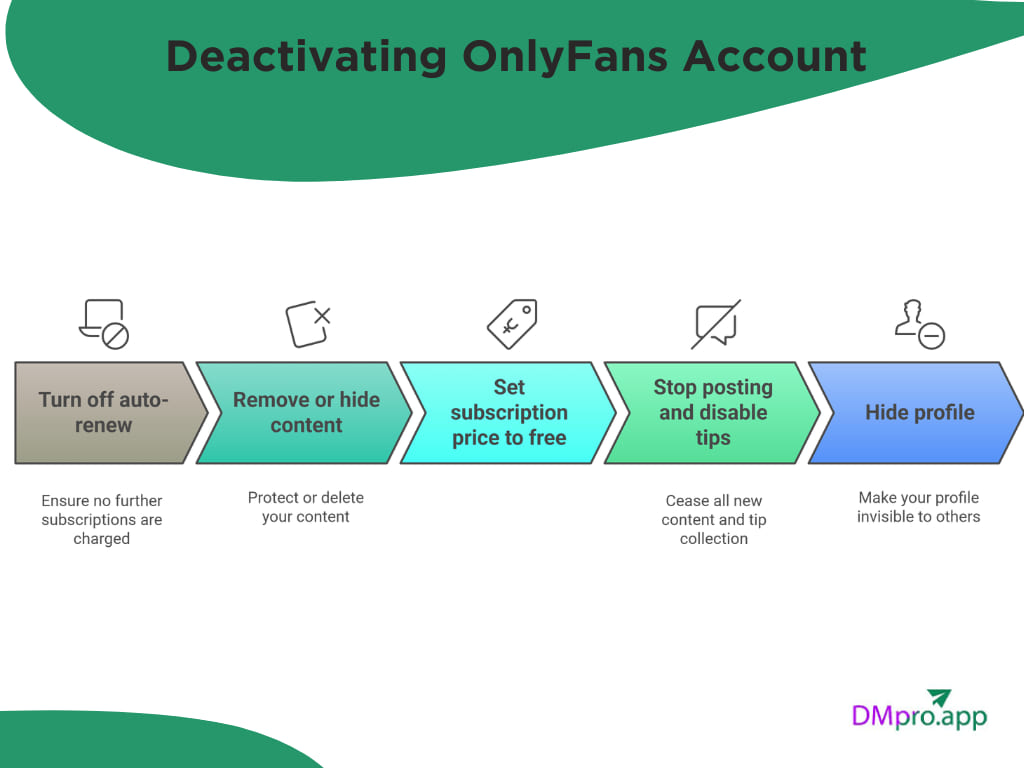
- Turn off auto-renew for all subscribers.
- Remove or hide your content.
- Set your subscription price to free or 0.
- Stop posting and disable tips.
- Hide your profile from the platform.
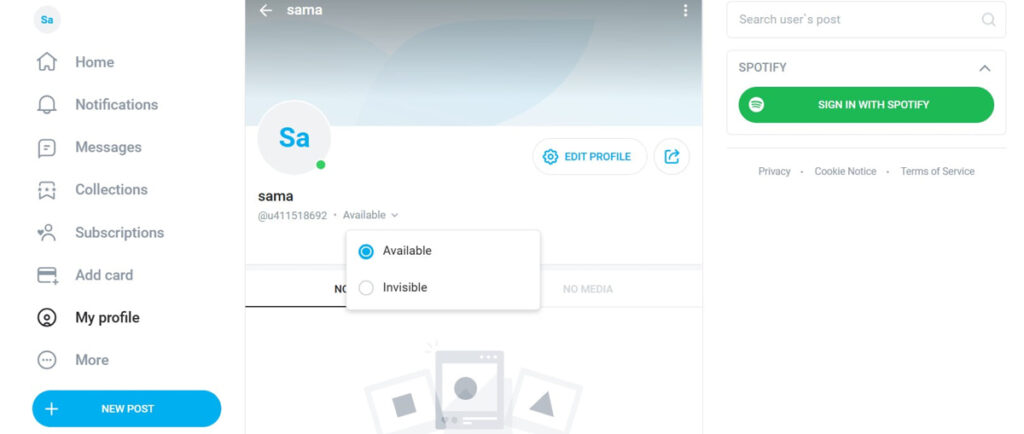
How To Hide OnlyFans Profile?
While there is no true answer to how to deactivate OnlyFans account, you can hide your profile from other users. Here is how to do it:
- Log in to your OnlyFans account and tap on your profile picture on the left toolbar.
- Tap on your profile to open it.
- In front of your OnlyFans username, click on the ‘Active’ option.
What to Consider Before Deleting Your OnlyFans Account
Now that you know how to delete OnlyFans account, keep these important points in mind before hitting the delete button.
1. Deletion Is Permanent
Once your creator account is deleted, you cannot restore it. All your data will be permanently removed, including
- Photos
- Videos
- Messages
- Subscribers
- Earnings data
2. Make Sure You Withdraw Your Money
Before deleting your account, check your earnings balance:
- Go to Wallet
- Withdraw any available funds
If you delete your account without withdrawing, you risk losing access to your remaining earnings.
Conclusion
Deleting your OnlyFans account is a personal decision, and there’s no right or wrong reason behind it. Here we have shown you how to delete OnlyFans account for both fans and creators. By understanding the permanent effects of deletion, withdrawing your remaining earnings, and considering alternatives like hiding your profile, you can make the right choice.
Additionally, if you want to leave the platform because you think OnlyFans is so overcrowded for creating content and making money, there are other sites like OnlyFans you can join.
FAQs
Unfortunately, no. After deleting OnlyFans account, there is no way to restore it. All your photos, videos, messages, and subscriber data will be removed forever. If you think you might return in the future, consider hiding your profile instead of deleting it.
If you’re a creator, your account won’t disappear immediately. After following the steps for deleting OnlyFans account, the platform waits until all your active subscriptions expire. This can take up to 30 days. During this time, no one can subscribe, and once the final subscription ends, your account will be deleted automatically.
No. When you start the deletion process, OnlyFans stops accepting new subscribers and prevents auto-renewals. Your remaining subscribers can only access your content until their paid period ends, and no future charges will occur.