
WhatsApp is end-to-end encrypted by default, and that part works. No one in the middle reads your messages, including WhatsApp. Which means almost every article telling you how to secure it is defending a door nobody is trying.
The two things that actually happen are simpler. Somebody takes your number – they get the six-digit registration code out of you and move your account to their phone. Or somebody reads a copy – an unencrypted cloud backup, a linked device left connected a year ago, a modified version of the app. Encryption in transit does nothing about either, because neither one is in transit.
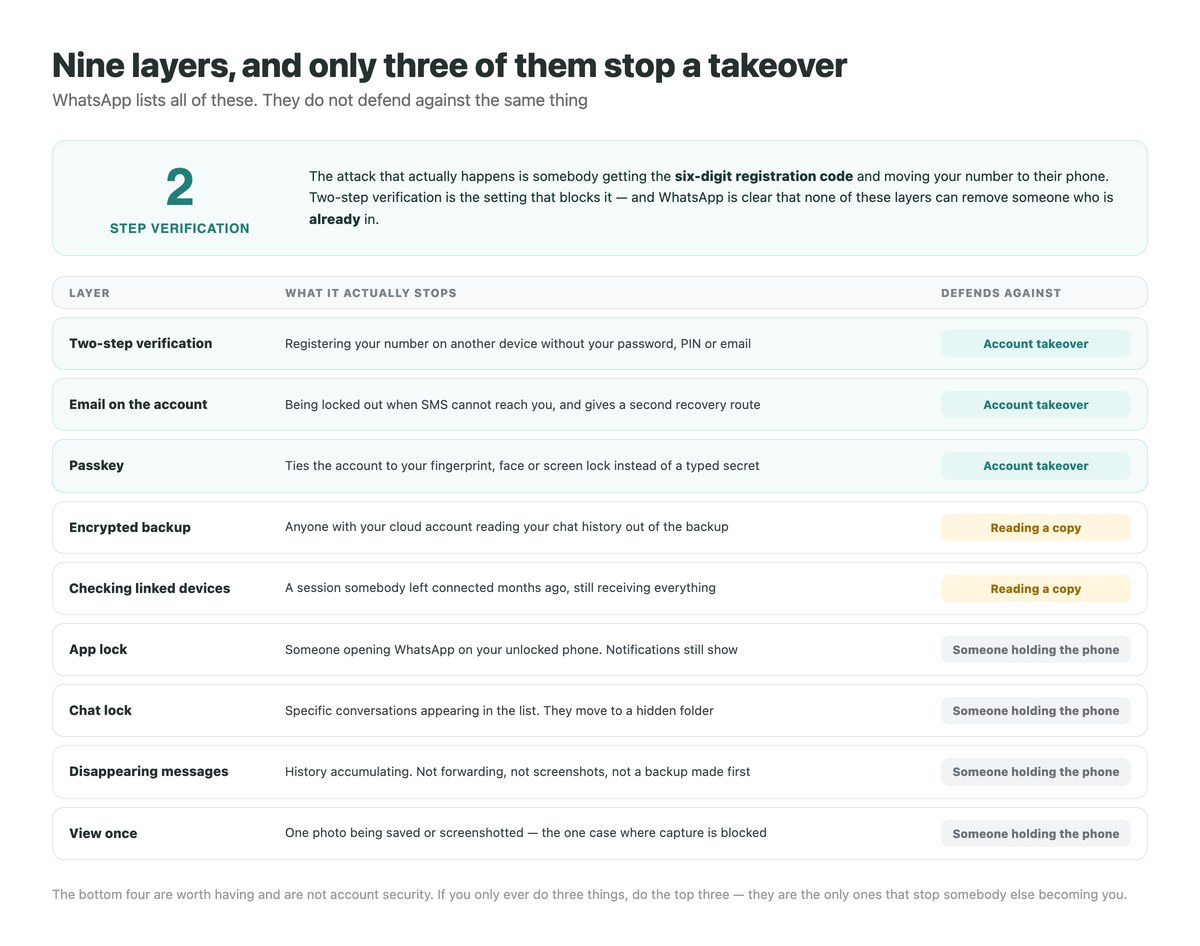
So this is not a list of sixteen tips. It is the settings ranked by what they stop, starting with the three that prevent someone else becoming you.
Key Takeaways
What Encryption Does Not Cover
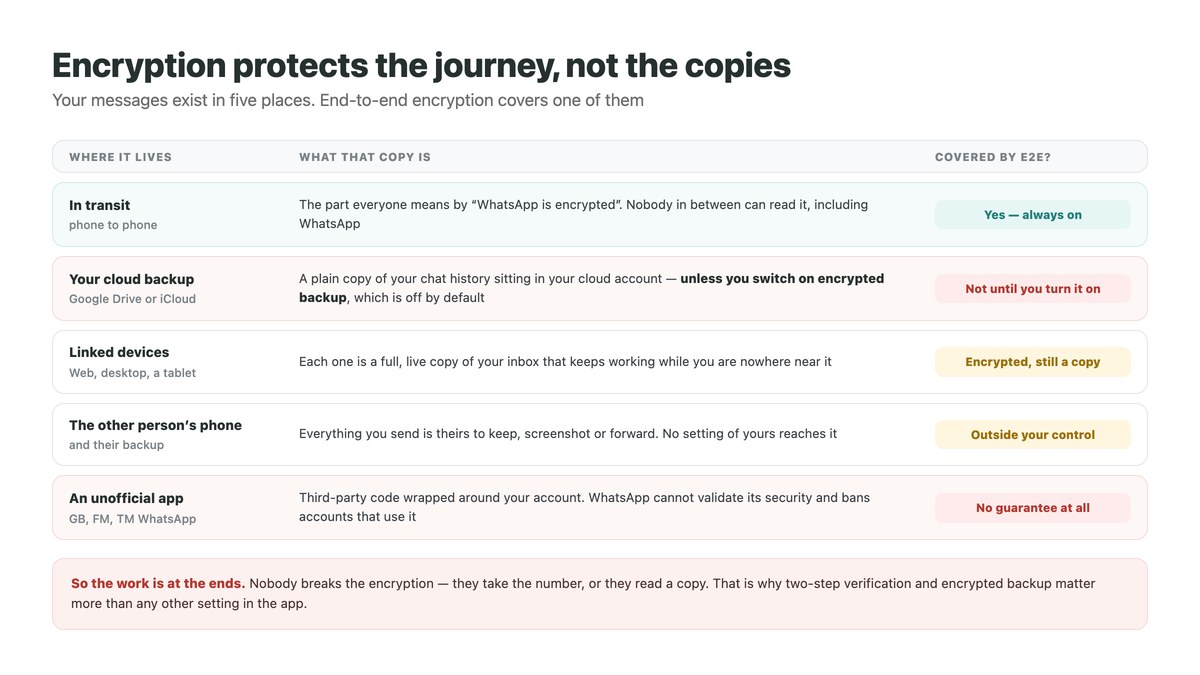
Worth being precise about, because the gap between what people think is protected and what is protected is where every real incident sits.
The Journey Is the Solved Part
End-to-end encryption means the message is readable on your phone and on theirs and nowhere in between. It is on by default, you cannot turn it off, and it is not the weak point in anybody’s WhatsApp.
Everything that follows is about the copies that exist at either end of that journey, because that is where the risk lives.
Your Backup Is a Copy Outside It
This is the one to fix first. When WhatsApp backs up your chat history to Google Drive or iCloud, that copy sits in your cloud account – and it is not covered by the chat encryption unless you have specifically turned on end-to-end encrypted backup.
WhatsApp protects an encrypted backup with a passkey, a 64-digit key it generates, or a password you choose. It is under Settings, then Chats, then Chat Backup. Anyone who gets into your cloud account reads an unencrypted backup as plain chat history; an encrypted one is useless to them.
WhatsApp cannot rescue you
Their own wording: they cannot send you a copy of the key, reset it, or restore the backup for you. Lose it and the backup is gone. Put it in a password manager the moment you set it.
A passkey is the easy version
It uses your fingerprint, face or screen lock rather than something to remember. It needs Android 9 or higher, a recent Google Mobile Services, and a screen lock already set.
Switching methods means turning it off
To move from a password to a passkey you have to disable encrypted backup and re-enable it. Not difficult, just not a toggle.
Every Linked Device Is Another Copy
WhatsApp Web, the desktop app and a second phone each hold a live copy of your conversations, and they keep receiving while you are nowhere near them. They do not expire on their own.
WhatsApp’s own advice is to review the list regularly – Linked Devices, then tap any device and log it out. A work laptop you handed back, a desktop at an old office, a tablet somebody else uses: each is a session someone can read, and none of them will remind you it exists.
The Other Person’s Phone Is Not Yours
Everything you send becomes theirs. They can screenshot it, forward it, back it up and keep it after you have deleted your side. No privacy setting of yours travels with the message.
This is the honest limit of all the in-chat privacy features further down. They manage your own history. They do not reach the other end.
Unofficial Apps Are a Stranger’s Code
WhatsApp names GB WhatsApp, FM WhatsApp, TeleMessage and TM WhatsApp among the modified versions people install for extra features. Using one breaks the Terms, and WhatsApp says it cannot validate their security or privacy practices at all.
Two concrete consequences rather than a vague warning: the account may be temporarily or permanently banned, including losing the ability to link devices, and only chat history created on the official app can be securely backed up. Our guide to freezing your last seen covers the same category of app from the other direction – they promise a feature and take the account.
The Attack That Actually Happens
Not an exploit. A phone call or a message, and a six-digit number.
How a Number Gets Taken
WhatsApp verifies you with a six-digit registration code sent by SMS. Somebody who wants your account triggers that code for your number and then needs you to read it out – so they message you from a hijacked friend’s account saying they sent it by mistake, or ring claiming to be support.
Hand it over and your account moves to their phone. They then have your conversations, your groups, and a trusted identity to run the same trick on everyone in your contacts.
The Signal You Should Never Ignore
WhatsApp’s account security guidance is specific: if a registration code arrives by SMS or email that you did not request, somebody is attempting to register your number right now. Do not tap any link in it and do not pass the code to anyone – not a friend, not support, not anyone.
If you ever see “Your phone number was registered with WhatsApp on a new device”, follow the recovery steps immediately rather than waiting to see what happens.
Two-Step Verification Is the Block
With it on, the registration code alone is not enough – your password, PIN or email is needed as well. It is the single highest-value setting in the app and it takes under a minute.
Add the email address when you set it up. Without one, forgetting the password locks you out for days; with one, it is a recovery route that does not depend on SMS reaching you.
Passkeys and the App’s Other Keys
A passkey ties the account to your device’s own security – fingerprint, face or screen lock – rather than to something typed. WhatsApp also offers a username key, an optional code controlling who can reach you by username, and parent PINs on parent-managed accounts.
One caveat that applies to all of them, in WhatsApp’s own words: turning these on cannot restore lost access or remove someone who is already using your account. They are prevention. If you think you have been taken over, recovery comes first and settings come after.
The Voicemail Detail
WhatsApp recommends setting a voicemail password that is hard to guess. The reason is not obvious: a registration code can be delivered by voice call, and a voicemail box on a default PIN is somewhere that call can land without you ever hearing it ring.
The Fifteen-Minute Setup
In this order, because the order is the ranking. The first three are the ones that matter.
Turn on two-step verification and add your email
Settings, Account, Two-step verification. This is the one that stops a number takeover. The email is a recovery route that does not need SMS to work.
Turn on end-to-end encrypted backup
Settings, Chats, Chat Backup, End-to-end encrypted backup. Choose a passkey if your phone supports it, otherwise a password – and save it in a password manager immediately, because nobody can recover it for you.
Audit your linked devices
Linked Devices, read the list, and log out anything you do not recognise or no longer use. Make it a habit, not a one-off: this is the list that quietly grows.
Remove any unofficial WhatsApp
If there is a modified version on the phone, uninstall it before installing the official app. Beyond the ban risk, its chat history cannot be securely backed up.
Set a voicemail password
Not a WhatsApp setting, but WhatsApp recommends it – a registration code can arrive as a voice call, and a default voicemail PIN is an open mailbox.
Turn on app lock, and chat lock if you share the phone
App lock puts your fingerprint or face in front of the whole app. Chat lock moves individual conversations into a hidden folder. Both are about someone holding your handset, which is a different problem from the first three.
Decide on a default message timer
Settings, Privacy, Default message timer. Twenty-four hours, seven days, ninety days or off. Read the limits in the next section before choosing – it does less than it appears to.
Privacy Inside the Chat, Honestly Described
These are good features. They are also routinely oversold, including by the article this one replaces.
What Disappearing Messages Really Do
Disappearing messages remove new messages after 24 hours, 7 days or 90 days. Either person can turn it on in a one-to-one chat, it affects new messages only, and a default for all new chats lives under Settings and Privacy.
The exceptions are where the oversell happens, and WhatsApp documents every one of them.
A forward escapes it
Forwarded into a chat where the feature is off, the message does not disappear. Neither does a quoted reply, which can outlive the original.
A backup freezes it
If a backup is taken before a message expires, the message is in that backup. Restore later and it comes back.
Anyone can keep a message
A recipient can keep one so it never expires. You are notified, and you have roughly thirty days to unkeep it – after which it stays.
View Once Is the Strict One
For a single photo, video or voice message, view once is genuinely tight: it is not saved to the recipient’s gallery, and WhatsApp blocks screenshots and screen recordings of it. That is the one place in the app where capture is actually prevented rather than discouraged.
It is for one item at a time, not a mode you live in – but if something should not persist, this beats a disappearing-message timer.
Chat Lock and App Lock
Locked chats move into a hidden folder behind your passcode, Face ID, fingerprint or a separate secret code. Nobody in the chat is told, and the chat closes itself when you lock the device.
App lock covers the whole app with biometrics, or a password on Web, Windows and Mac. One thing to know: you can still reply from notifications while it is locked, so turn off message previews too if the point is that nobody reads them over your shoulder.
The Settings That Are Privacy, Not Security
Profile photo visibility, last seen, status audience and read receipts control what people learn about you, not who can get in. Worth setting, in a different category.
Our guides to WhatsApp settings worth changing and why a profile photo vanishes and comes back cover that side, including why a disappearing photo is usually a privacy setting rather than a block.
What Each Setting Is Actually For
Sorted by the threat, because a setting aimed at the wrong threat is a false sense of security.
| If you are worried about | The setting that helps | What it will not do |
|---|---|---|
| Someone stealing your number | Two-step verification, plus email on the account | Remove them if they are already in – recover first |
| Someone reading your cloud backup | End-to-end encrypted backup | Protect history made on an unofficial app |
| An old session still connected | Reviewing and logging out linked devices | Alert you – nothing prompts this review |
| Someone picking up your phone | App lock, chat lock, notification previews off | Stop a reply from the notification shade |
| A photo being kept | View once | Apply to ordinary messages or whole chats |
| History piling up | Disappearing messages | Survive a forward, a quote or an earlier backup |
If any of this is about a number people message you on for business rather than a personal account, the threat model changes – and so does the right answer.
If It Is a Business Number
Different problem, and the usual fixes make it worse rather than better.
Shared Phones Are the Real Exposure
A business WhatsApp usually ends up on a handset several people touch, with linked devices handed out as staff change. Every one of those is a live copy of every customer conversation, and when somebody leaves, the sessions do not leave with them.
Passing the phone around also means the registration code lands wherever the phone is, which is the exact thing two-step verification exists to control. Our guide to running a WhatsApp team inbox covers why the shared-handset arrangement breaks down and what replaces it.
Scam Traffic Is a Volume Problem
A public business number attracts wrong-number approaches, fake job offers and investment pitches alongside real enquiries, and the cost is the triage rather than any single message. Checking whether a WhatsApp number is fake covers what you can establish about a sender and what no tool can tell you.
Where DMpro Fits
DMpro connects a WhatsApp Business account through Meta’s own authorisation flow, so nobody types a password anywhere and no handset is passed around. It answers inbound messages on keywords, routes anything unusual to a person, and keeps every thread logged where a chat on one phone would not be.
It is the opposite of the modified-app route: an official connection, revocable from your own Meta settings, rather than third-party code wrapped around your account. For what the free app can do on its own first, see WhatsApp Business auto reply, and WhatsApp automation for the routes above it.
What No Tool Should Ask For
Your registration code, your two-step PIN, or your password. Any service requesting one of those is taking the account, whatever it says it is doing with it. The same rule holds for our Chrome extension, which runs in your own browser session, and for contactID – neither asks for a password, and nothing legitimate does.
The Shared Handset Is the Security Hole
A phone three people use, linked devices nobody has audited since last year, and a registration code that lands wherever the handset happens to be. That is how business WhatsApp accounts are actually lost.
DMpro answers your customers through WhatsApp’s official connection instead – authorised from your Meta account, revocable from it, and with no reason for anybody to hold the phone.
- Official Meta authorisation – no password, no code sharing
- Keyword replies that route anything unusual to a person
- Every conversation logged outside a single handset
- Access you can revoke from your own Meta settings
- The same inbox across Instagram, Messenger, Telegram and TikTok
- Nobody needs to hold or share the business phone
- Access is granted and withdrawn from Meta, not from a device
- Conversation history survives a phone being replaced
- It covers a WhatsApp Business account, not a personal number
- It cannot message anyone who has not contacted you first
Conclusion
If you do three things, do these: turn on two-step verification, add an email to the account, and switch on end-to-end encrypted backup. Those close the two gaps that actually get exploited – somebody taking your number, and somebody reading a copy of your history out of the cloud.
Everything else is worth having and is a smaller problem. App lock and chat lock defend against a person holding your phone. Disappearing messages and view once manage what accumulates. None of them is account security, and treating them as though they were is how people end up well protected against the wrong thing.
And remember WhatsApp’s own caveat, because it is the one people learn the hard way: these settings prevent a takeover, they do not undo one. The six-digit code is the whole account. It goes to nobody.
Official Meta connection, no password shared, every thread logged. Free plan to start.
Start free