
Most ads send people somewhere to read. Ads that click to Instagram Direct send them somewhere to talk: tap the button and a chat with your business opens inside Instagram, with your greeting already waiting.
For businesses that sell through conversation – anything with a question before the purchase, a booking, a quote or a size to confirm – that is a better landing page than a landing page. It also moves the hard part of the funnel from the ad account into the inbox, where most campaigns quietly lose their money.
This guide covers the setup, the message template that greets people, what your tools learn from the click, and the free version of the same idea for your own traffic. It is part of the wider approach to DM marketing.
Key Takeaways
What These Ads Are, and Where They Run
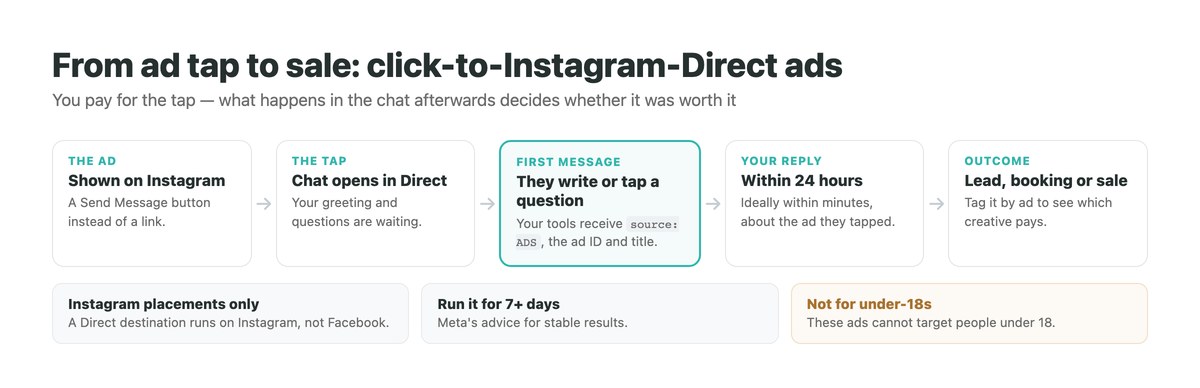
Meta calls them ads that click to message. The creative looks like any other ad, but the button says Send Message, and tapping it opens a conversation with your business instead of a web page. Instagram Direct is one of three possible destinations; Messenger and WhatsApp are the others.
The destination decides where the ad can appear. According to Meta’s overview, an ad that clicks to Instagram Direct is shown on Instagram only, while Messenger and WhatsApp destinations can run across Facebook, Instagram and WhatsApp. Messages arrive in the inbox of the destination you picked.
If you answer customers on more than one of those apps, a single campaign can use multiple destinations and send each person to the app they are most likely to engage on, with the budget shared according to the likelihood of a conversation.
Setting One Up in Ads Manager
These are the steps from Meta’s setup guide. You need an Instagram business account; without a Facebook Page, Meta asks you to create a business portfolio and add the Instagram account to it.
Pick the objective
Traffic, Engagement, Leads or Sales, depending on what you want the conversations to produce.
Set the conversion location
For Traffic, Engagement or Sales choose Message destinations, then Instagram. For Leads, choose Instagram.
Set audience, placements, budget and schedule
Remember these ads cannot target people under 18, and some messaging features are unavailable for ads delivered to and from Europe and Japan.
Build the creative
Choose the format and media, and make it obvious that tapping opens a chat.
Create the message template
Under Message template, create a new one or reuse an existing one, then build the flow and click Save and finish.
Publish and leave it running
Meta recommends letting click-to-message campaigns run for seven or more days before judging them.
The Message Template Is Half the Ad
When the chat opens, the first thing people see is your template: a greeting and a set of questions they can tap, as described in Meta’s guide to creating one. It is the landing page of this ad, and it deserves the care you would give a landing page.
Meta’s best practices are concrete. Greet people in a way that shows you are available. Use custom FAQs in Instagram Direct so people can start with one tap. Add a follow-up message to the template to remind people to book or use a promotion. And say in the creative itself that tapping opens a chat – Meta suggests wording like Message us to learn more, with a Send Message or Chat Now button.
The questions matter most. Each should be something a buyer genuinely wonders before buying – price, availability, delivery, fit – so that tapping one is already a step towards a sale. The same icebreaker idea for organic chats is covered in our guide to Instagram’s built-in auto replies.
Instagram Direct, Messenger or WhatsApp as the Destination
The destination is not only about where you reply – it changes where the ad can be shown.
| Destination | Where the ad can run | Where you reply |
|---|---|---|
| Instagram Direct | Instagram inbox | |
| Messenger | Facebook, Instagram, WhatsApp | Messenger inbox |
| Facebook, Instagram, WhatsApp | WhatsApp Business | |
| Multiple destinations | Across the destinations chosen | Each person’s most likely app |
WhatsApp has an extra rule of its own around conversations that start from ads, which changes the economics there – covered in our guide to click-to-WhatsApp ads. For Instagram, the standard 24-hour messaging window applies once the person writes to you.
What Your Tools Learn From the Click
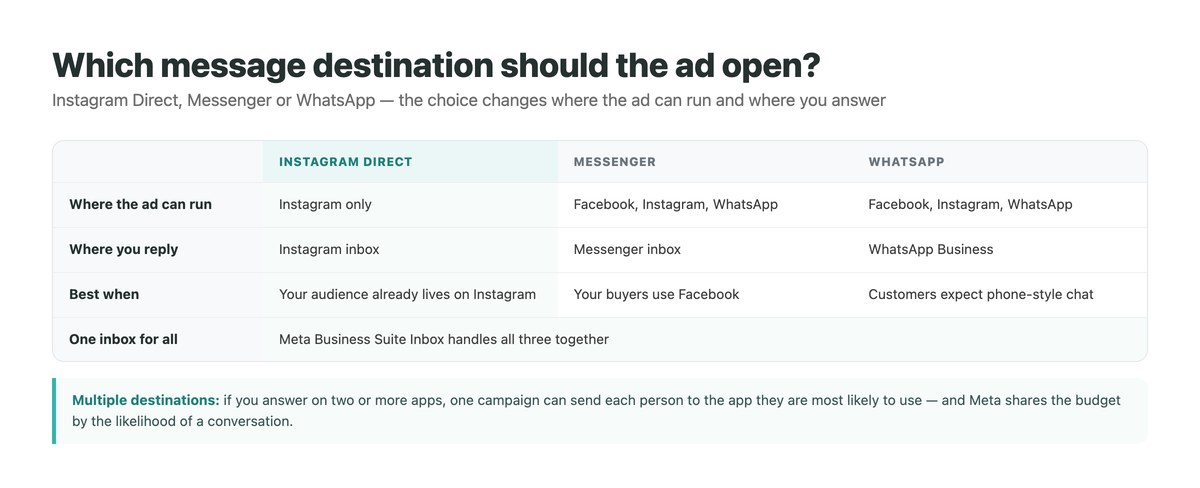
This is the part most guides leave out. When someone starts a conversation from one of these ads, the first message your tools receive carries a referral object. Meta’s webhook examples show it with the source set to ADS, the ad’s ID, a ref value if you set one, and context data including the ad’s title and the image or video thumbnail.
That changes what a good first reply looks like. Instead of a generic hello, an automation – or a person looking at the thread – can see which ad was tapped and answer about that product, that offer, that price. Someone who tapped an ad for a specific jacket should not be asked what they are looking for.
It also makes the ads measurable beyond clicks: tag each conversation with the ad it came from and you can see which creative produces buyers rather than chats. How the rest of the messaging API works is in our guide to the Instagram DM API.
Answering Ad Conversations With DMpro
On Instagram, a conversation that starts from one of these ads arrives as a DM, so DMpro handles it with a Direct message campaign.
Match the ad’s questions
Use the questions from your message template as keywords with Contains matching – in stock, price, sizes – so each tapped question gets its own flow.
Answer with the product
Send product cards from your connected Shopify, WooCommerce or Etsy store, or a click-tracked link to the exact item in the ad.
Qualify in one step
A Paths step – Size M, Size L, Talk to us – or Wait for reply for a free-text answer.
Pass warm leads on
A webhook step sends the lead to your CRM, and the thread stays in the Conversations inbox for your team.
Running Messenger ads too?
DMpro’s Facebook triggers include Messenger referral, for click-to-Messenger ads and m.me links, and Lead Ad form submissions.
Using the Leads Objective
If the goal is qualified leads rather than open conversations, choose the Leads objective with Instagram as the destination. Meta then offers chat templates designed for it: one that starts conversations with FAQs, an automated chat that asks qualifying and contact questions, and one that hands the flow to a partner app.
The automated chat is the closest thing to a form inside a conversation, and it works best when the questions are few and the reward for answering is clear. Offering something useful at the end – a price guide, a checklist – is the same pattern as a lead magnet for Instagram, paid for rather than organic.
Whatever template you use, the leads still need an answer from someone. A lead who finishes the questions and hears nothing for a day is a lead you paid for twice.
ig.me Links: The Free Version for Your Own Traffic
You do not need an ad to send people into a chat. Meta’s ig.me links open a conversation with your account from anywhere – a bio, an email, a QR code, a text message. The format is ig.me, your username, and an optional ref parameter.
The ref parameter is what makes them trackable. It can be up to 2,083 characters of letters, numbers, hyphens, underscores and equals signs, so you can give each placement its own code. When someone reopens an existing conversation through the link, Meta sends a referral event with that value to your tools.
Meta also notes that this resets the 24-hour window for standard messaging, so the tool can reply after receiving it. For many businesses, a well-placed ig.me link does much of what a click-to-Direct ad does for traffic you already have.
Measuring What the Ads Actually Produce
Ads Manager reports conversations started. That is the beginning of the measurement, not the end.
| Measure | Why it matters |
|---|---|
| Conversations started | Tells you the creative and targeting work |
| Replies to your first question | Tells you the template works |
| Time to first human answer | The step where most paid conversations are lost |
| Qualified leads per ad | Needs conversations tagged with the ad they came from |
| Sales per ad | The only number that says whether the spend paid off |
Why These Campaigns Underperform
When click-to-Direct campaigns disappoint, the ad is rarely the reason. The usual culprit is the reply: the chat opened at 10pm, the greeting promised an answer, and the answer came the next afternoon. By then the person has moved on, and the ad account reports a conversation that never really happened.
The second cause is a template that does not invite a reply – a greeting with no question, or questions nobody wonders about. The third is impatience: judging a campaign after two days, when Meta recommends seven.
The fixes are unglamorous: questions worth tapping, a reply plan for every hour the ad runs, and conversations tagged by ad so you can see what worked. If automated replies are part of that plan and stop behaving, our guide to Instagram DM automation not working covers the usual causes.
Answer Every Paid Conversation
A click-to-Direct ad is only as good as the reply that follows it. Every unanswered chat is ad spend with nothing to show for it, and most go unanswered outside working hours.
DMpro answers ad-started DMs the moment they arrive – with product cards from your store, tracked links and qualifying menus – and on Instagram it can use AI responses for the questions nobody scripted.
- Direct message triggers matched to your ad’s questions
- Product cards from Shopify, WooCommerce or Etsy
- Click-tracked links to the product in the ad
- Messenger referral and Lead Ad triggers on Facebook
- Webhooks to your CRM
- No paid conversation left waiting overnight
- See which products get clicked from ad chats
- One inbox for every chat an ad starts
- The ad, targeting and budget are still yours to get right
Conclusion
Click-to-Instagram-Direct ads open a chat instead of a website. Set them up in Ads Manager with Instagram as the message destination, remembering they run on Instagram only and cannot target people under 18.
Write the message template first: a greeting that invites a reply and questions a buyer genuinely wonders about. Use the ad data in the first message to answer about the exact ad that was tapped, and tag conversations so you can see which creative sells.
Give campaigns at least a week, answer every chat quickly, and use free ig.me links to do the same for traffic you already have.
Ad-started DMs answered with products and menus – 250 conversations a month free.
See how it works