
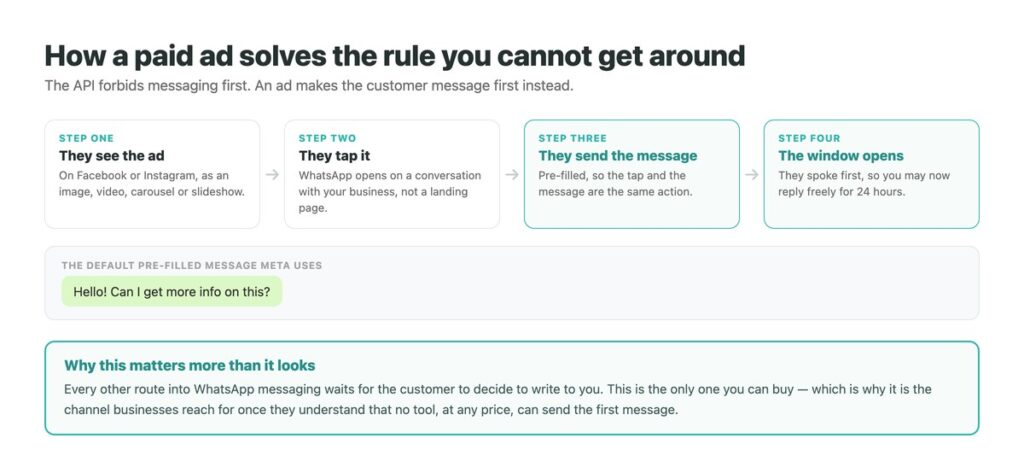
Every business messaging platform has the same hard limit: you cannot message someone who has not messaged you. It is not a setting, a permission tier or a tool that has not been built yet, and it applies to WhatsApp and Instagram alike.
Ads that click to WhatsApp are the exception, and they are the exception in an interesting way. They do not let you send the first message – they let you pay for the customer to send it. The tap and the message are the same action, so a click arrives as a conversation.
That makes them the only outbound lever on the channel, which is why every messaging platform of any size has invested in them. It also makes them fail for a reason that has nothing to do with the ad, covered below. The constraint they exist to solve is set out in our guide to what the messaging APIs permit.
Key Takeaways
What These Ads Actually Are
Meta’s description is straightforward: ads that click to WhatsApp send people who click your ad directly into a conversation with your business in WhatsApp. They run in the ordinary Facebook and Instagram ad placements and support the usual formats – image, video, carousel and slideshow.
The mechanical difference from any other ad is the destination. Instead of a landing page there is a chat thread, already open, with a message ready to send. There is no form, no page load and nothing to fill in.
If your business also uses Messenger or Instagram Direct, Meta allows several message destinations on the same ad and routes each person to whichever they are most likely to engage with. That is worth knowing before assuming this is a WhatsApp-only decision.

Why the Pre-Filled Message Matters More Than It Looks
Meta pre-fills the first message so the customer does not have to think of one. The default text is “Hello! Can I get more info on this?”, and it can be customised.
That default is doing a lot of quiet work. Asking someone to open a chat and compose an opening line is a real barrier – it is the reason most people who consider messaging a business do not. Removing it converts a tap into a conversation without the person ever deciding to start one.
It is also the most under-used lever in the whole setup. A pre-filled message that names the specific thing the ad was about tells you which ad produced the conversation, and gives whoever answers something to work with beyond hello. Changing it costs nothing and most advertisers never do.
The Rule This Gets You Around
Meta’s messaging APIs only allow a business to reply. Someone must message you before anything can be sent to them, which rules out cold outreach on WhatsApp and Instagram completely, whatever a given tool advertises.
A click-to-WhatsApp ad does not break that rule; it satisfies it. The customer sends a message, so the standard 24-hour window opens and you may reply freely in your own words, with no template and no approval. Everything that follows is an ordinary conversation.
This is why the channel behaves so differently from email. There is no list to buy and no sequence to send into silence – the only way to start more conversations is to give more people a reason to start one, and this is the version of that you can pay for. It is also the practical answer to the argument in our notes on why cold messaging stopped working.
There is a second advantage that Meta does not advertise loudly and almost no coverage mentions: messages sent within 72 hours of an ad click are not charged, in any category. Ordinarily only service replies inside the 24-hour window are free and anything after it needs a paid template. An ad click buys three days of free messaging instead, which makes these the cheapest reach on the platform – and most advertisers let the window lapse without using it. The full picture of what is charged is in our guide to WhatsApp bulk messaging costs.
Compared With Sending the Click Elsewhere
Same budget, same audience, materially different economics.
| To a landing page | To a lead form | To WhatsApp | |
|---|---|---|---|
| What you get | A visit | A row of data | A conversation |
| Effort asked of them | Read, then decide | Fill in fields | Send one tap |
| Can you follow up | Only if they convert | By email or phone | Freely, for 24 hours |
| Objections get answered | No | No | Yes, before the sale |
| What it demands | A good page | A good offer | Somebody answering |

Setting Them Up Without Wasting the First Week
In this order, because the last two are what decide whether the budget returns anything.
Connect the WhatsApp Business account first
The account has to be linked before the destination appears in Ads Manager. Doing this while a campaign is already built is the usual first-day delay.
Write the pre-filled message yourself
Name the specific product or offer rather than leaving the default. It identifies the source of the conversation and gives whoever replies a starting point.
Decide who answers before you spend anything
Not later, and not “we will see how many come in”. Delivery does not respect your working hours, and the first hour of a campaign is when the most arrive.
Set up an automatic first reply
Even a holding message beats silence. Speed is the variable this channel rewards, and it is the only one fully in your control – our guide to WhatsApp automation covers what the free app can already do.
Measure replies, not conversations started
Ads Manager counts a conversation as started when the message arrives. Whether anyone answered it is not in that number.
What to Put in the Pre-Filled Message
The default works. Naming the thing works better, and it costs one line of setup.
| Instead of the default | Write something like | What it buys you |
|---|---|---|
| Hello! Can I get more info on this? | I saw the spring pricing – is it still on? | You know which campaign produced it |
| Hello! Can I get more info on this? | I would like to book for four on Saturday | The reply can be useful immediately |
| Hello! Can I get more info on this? | Do you ship to Spain? | The objection is on the table at message one |
| Anything generic | Anything specific | Routing, attribution and a faster answer |
Why They Fail, and It Is Never the Ad
A campaign that produces plenty of conversations and no revenue is the common outcome, and the ad account will look healthy throughout.
The reason is that cost per conversation started is a delivery metric, not a business one. It counts the message arriving. It knows nothing about whether it was answered in ten seconds or four hours, whether the answer was any good, or whether the person was still interested by the time it came. A cheap conversation nobody replied to is worse than an expensive one that got an instant answer, and the reporting cannot tell them apart.
So the honest prerequisite is uncomfortable: these ads convert paid clicks into work. If nobody is going to answer within minutes during the hours the ads run, the money is better spent on a destination that does not need a person – which is a legitimate answer and better reached before the budget than after it.
Where They Genuinely Work Best
Anything with questions attached before the money moves. Considered purchases, services that need scoping, bookings with a date to agree, products where fit or sizing is uncertain. In all of these the objection that would have caused a bounce becomes a message you can answer – which is the same mechanism behind everything in our guide to conversations that actually convert.
They also suit markets where WhatsApp is the default way people contact a business at all – much of Latin America, South Asia, the Middle East, southern Europe. There, a website contact form is the unusual ask and a chat is the expected one.
They work least well for cheap impulse products where a conversation is friction rather than help, and for any business that cannot staff the replies. If a conversation is going to sit unanswered until morning, the ad has bought a worse outcome than a landing page would have – and once volume is real, joining those threads to an inbox several people can work in stops being optional.
The Half the Ad Account Cannot See
Ads Manager reports the conversation as soon as the message lands. Everything that decides whether the budget returns anything happens afterwards, in a place the ad account has no visibility into at all.
DMpro answers on arrival so nobody waits, routes the conversation to whoever should handle it, and keeps one history per customer across WhatsApp, Instagram and TikTok – so a lead that came from an ad and came back a week later is still the same person.
- Automatic first reply the moment an ad conversation arrives
- Routing by what the pre-filled message says, so campaigns stay separable
- One history per customer, across channels and across weeks
- Handover to a person inside the same thread
- Reply speed measured, not just conversations started
- No paid click sits unanswered because it landed out of hours
- You can tell which campaign a conversation came from
- A returning lead is recognised rather than starting again
- It cannot make a conversation profitable if the offer was not
Conclusion
Click-to-WhatsApp ads are the only way to buy the first message on a channel where you are otherwise forbidden from sending one. The customer taps, a pre-filled message goes, the 24-hour window opens, and you reply freely.
The pre-filled text is the cheapest improvement available and almost nobody changes it. Naming the product tells you where the conversation came from and gives whoever answers something to work with.
And the failure mode is always the same: the ad account reports cost per conversation started, which counts messages arriving rather than messages answered. If nobody can reply within minutes while the ads run, this is the wrong destination – and that is worth deciding before the budget rather than after.
Instant replies and one customer history across WhatsApp, Instagram and TikTok.
See it answer on arrival