
Learning how to mass DM on Instagram is one of the fastest ways to reach creators, customers and leads without spending on ads, and it sits at the heart of Instagram DM marketing. The catch is that most people do it wrong. They paste the same line to hundreds of strangers, and Instagram throttles or blocks the account within a day.
Done well, mass DMing is personal, paced and deliberate: a relevant list, a message that could only have been written to that person, and gaps between sends that look like a human at a keyboard. This guide covers the safe daily volumes for 2026, a five-step campaign workflow, how to personalize at scale, where to find the right people, and the mistakes that cost accounts.
If you would rather not do it by hand, the DMpro Chrome extension automates the writing and the sending: it drafts a personal DM for every profile with AI and sends it automatically from your own account, at a pace you control.
Key Takeaways
What Does It Mean to Mass DM on Instagram?
To mass DM on Instagram means sending direct messages to many people in a short period, usually as part of an outreach or promotion campaign. Creators use it to pitch brand collaborations, brands use it for influencer outreach, sales teams use it to reach decision-makers, and agencies use it to book clients. The messages go to a list you chose, one after another, rather than one at a time by hand.
Mass DM Versus Spam
The difference is not the number of messages, it is how they read and who receives them. One identical line sent to a thousand random accounts is spam, and Instagram treats it that way. A personalized note sent to a relevant list, spaced out like a person would send it, is Instagram DM outreach, and it is how plenty of businesses find their first clients.
Mass DM Versus a Group Chat
Instagram’s group chats put everyone in one shared thread, so each person sees the others and nothing can be personalized. That is useful for a team or a community, and useless for outreach. A real mass DM campaign sends a separate, one-to-one message to each person on the list.
Is It Safe to Mass DM on Instagram?
It is far safer when the messages are personalized and paced, and risky when they are not. Instagram does not publish a rule against messaging many people; what its systems flag is behaviour that looks automated or unwanted.
What Instagram’s Systems Look For
Four patterns cause most blocks: too many sends in a short window, perfectly regular timing between messages, the same text going to many recipients, and a sudden burst from an account that is usually quiet. Messages that recipients report as spam make everything worse.
Identical text
Sending the exact same message a hundred times is the clearest spam signal there is.
Mechanical timing
A message every 60 seconds exactly looks like a script; random gaps look like a person.
Volume on a new account
A brand-new profile sending dozens of DMs on day one is the fastest route to an action block.
What No Tool Can Promise
Automating DMs on Instagram can still breach its terms of use, and no tool can remove that risk entirely – including ours. What a good tool does is keep you well inside the patterns Instagram tolerates: personal messages, conservative volumes and natural pacing. Read Instagram’s DM rules before you start, and treat safety as the foundation rather than an afterthought.
Instagram DM Limits to Know in 2026
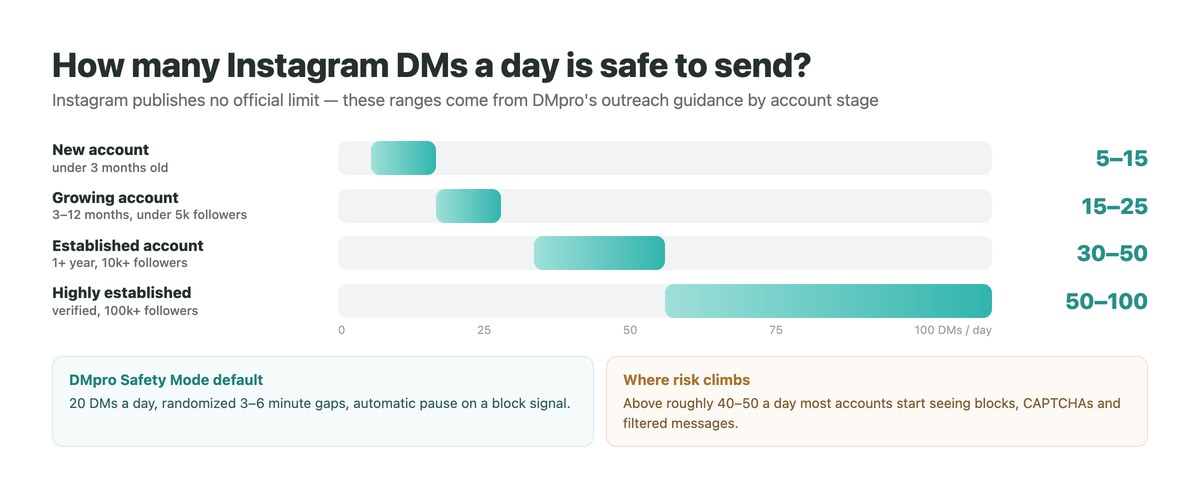
Instagram does not publish exact DM limits. The ranges below reflect what keeps accounts healthy in practice, so match your volume to your account’s age, size and history rather than to a single number. Our guide to the Instagram DM limit covers the other limits, such as message length.
| Account stage | DMs per day | What to do |
|---|---|---|
| New, under 3 months | 5 to 15 | Warm up first, skip links in the first messages |
| 3 to 12 months, under 5k followers | 15 to 25 | Personalize every message, keep gaps random |
| Established, 1+ year, 10k+ followers | 30 to 50 | Spread sends across the whole day |
| Verified, 100k+ followers | 50 to 100 | Still personal, never in bursts |
TikTok applies the same logic and tends to be a little more lenient, though new TikTok accounts still hit limits early. If you run outreach on both, ramp each account separately – the two platforms track activity independently.
How to Mass DM on Instagram in 5 Steps
This is the workflow with the DMpro Chrome extension, which runs inside Chrome and sends from the Instagram session you are already logged into.
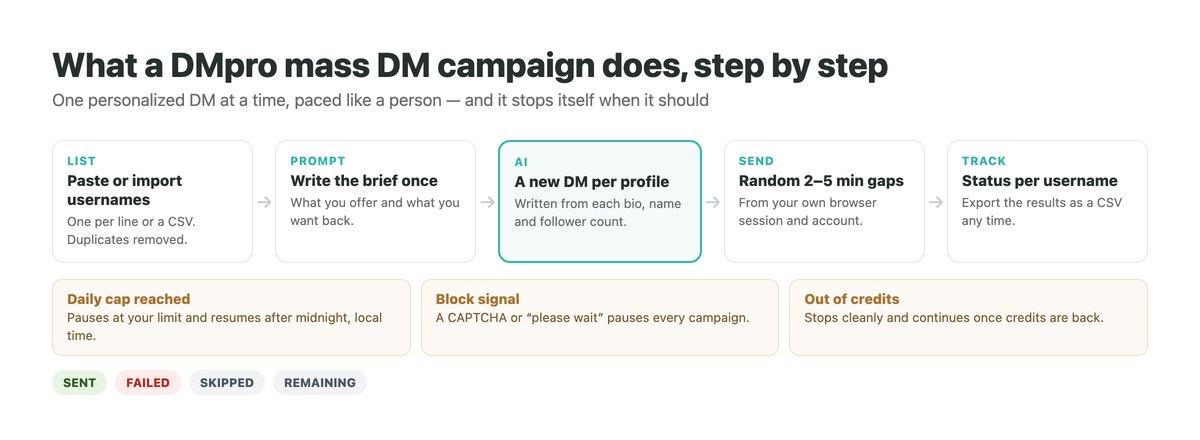
Create an account and add the extension
Sign up with your email – DMpro is passwordless and never asks for your Instagram password – then add the extension from the Chrome Web Store. The free tier includes 10 AI-written messages a month, so you can test the whole flow before paying.
Write your prompt once
Describe who you are, what you offer and what you want back. Variables such as the person’s name and bio let the AI adapt the message to every profile. The templates library gives you starting prompts for collaborations, sales and recruiting.
Build the list
Paste usernames, one per line or comma-separated, or import a CSV. Duplicates are removed automatically, and each campaign targets one platform, so Instagram and TikTok lists run as separate campaigns.
Set the daily limit and delays
The daily limit runs from 1 to 200 and defaults to 30; the delay between sends is randomized between a minimum and maximum, 2 to 5 minutes by default. With Safety Mode on, the lower cap of 20 a day and 3 to 6 minute gaps apply.
Start, watch and export
Press Start and DMpro sends one personalized DM at a time, showing sent, failed, skipped and remaining for every username. You can pause, resume or stop at any point, and export the results as a CSV.
Two Ways to Send Automatically: Auto-Send or Campaigns
DMpro gives you two automatic modes, and most people use both: one for profiles you find while browsing, one for a prepared list. Our bulk campaigns guide in the DMpro knowledge base covers the settings in more detail.
Auto-Send DM: One Click Per Profile
With Auto-Send on, clicking Generate on a profile writes the message and sends it in the same step – no review, no second click. It suits focused sessions where you move from profile to profile yourself.
When to use it
Once your prompt is tested and you trust the output, for 20 or more profiles in a session.
When to keep review on
While you are still refining the prompt. There is no undo once a DM has been sent.
Campaigns: A Whole List on Autopilot
A campaign takes the list, the prompt and the pacing, then sends on its own over hours or days. It is the real mass DM mode.
What needs to stay open
Your browser, with the extension signed in and your Instagram account logged in. The campaign runs in the background while you work.
What pauses it
Reaching the daily cap (it resumes after midnight), a block signal from Instagram, or running out of credits.
How to Personalize Mass DMs at Scale
Personalization is what separates outreach from spam, and it is also what keeps Instagram from seeing the same text again and again. Every message should read as if you wrote it for that one person, even when dozens go out in a day.
Write the Prompt, Not the Message
With DMpro you write one prompt that explains who you are and what you want. The AI reads each profile’s name, bio, follower count and category and writes a different DM for every person. Keep separate prompts for separate campaigns – a collaboration pitch and a sales pitch should not share one.
Make the First Line Genuinely Specific
A generic opener with a name swapped in still reads as a template. Ask the AI to reference something real from the bio, then get to your point in one or two sentences. If a bio is empty, tell the prompt what to fall back on, such as the account’s niche.
Let the Data Finish Loading
Instagram sometimes loads a bio a moment after the rest of the profile. DMpro’s Smart Message Update notices when the profile data changes and offers to regenerate, so a message is not written from half a profile.
How to Mass DM Without Getting Banned
The fastest way to lose an account is to rush, because Instagram can restrict accounts that send DMs that look automated. These habits keep you safe:
- Warm up first. Post, like and browse normally for a week or two before sending at volume.
- Personalize every message. Unique copy is safer copy, and it earns more replies.
- Keep Safety Mode on while you learn. 20 a day with random 3 to 6 minute gaps is conservative by design.
- Lead with value, not a link. Save the link for the reply, once a conversation has started.
- Stop at the first warning. After a block, wait 24 to 48 hours, do not test by sending manually, then restart low – 5 the first day, 10 the next, then 15.
What Instagram Says About Automated Activity
Instagram’s own help centre sets out its rules on spam and automated behaviour. Tools reduce the risk; your habits are what keep the account alive.
How to Find People to Mass DM
A campaign is only as good as its list. The warmest people to message are those who already care about your niche. Whatever the source, clean the list first: drop inactive, private and irrelevant accounts to protect your reply rate and your account.
Your Own Engagers
People who liked, saved or commented on your recent posts already know who you are. They are the easiest yes.
Niche and Competitor Audiences
Accounts that follow and engage with others in your space have already shown interest in your topic. Collect the handles that genuinely fit, not every follower.
Hashtag and Location Searches
A niche hashtag or a city tag is a clear signal of interest or location – useful for local businesses and event promotion.
A List You Already Have
Any list of handles from a spreadsheet, a CRM or a previous event can be imported as a CSV. On the Professional plan and above, DMpro also saves email addresses it finds in Instagram bios, giving you a second channel for follow-ups.
When the List Is Businesses, Not People
Sometimes the spreadsheet holds company websites rather than handles – suppliers, agencies, venues, local trades. Mass DM is the wrong instrument for that list, and not because of any limit: most of those businesses do not staff their Instagram inbox at all, so a perfectly written DM goes unread.
For a list of websites the equivalent tool is contactID, a separate extension that opens each site in a background tab, locates its contact form and submits your message with the business name filled in. Keep the two lists apart rather than forcing one channel to serve both.
Mass DM Templates and Prompts That Convert
Use these as starting points and shape them to your voice. For more, browse our Instagram DM templates.
Message Templates
Creator collaboration
“Hey [name], your recent post on [topic] was great – that tip on [detail] stuck with me. We work with creators in your space and would love to collaborate. Open to hearing the idea?”
Product or offer
“Hi [name], I think [product] would fit what you do with [niche]. Happy to send one to try, no strings. Want me to set it up?”
Re-engagement
“Hey [name], it has been a while! We just launched [new thing] and thought of you. Want the quick rundown?”
An AI Prompt to Paste Into DMpro
“Write a short, friendly Instagram DM to this creator. Reference one specific thing from their bio, introduce [my brand] in one line, and end by asking if they are open to a paid collaboration. Keep it under 40 words and avoid sounding salesy.”
Common Mass DM Mistakes to Avoid
Most blocks and dead campaigns come from a short list of avoidable errors.
| Do | Don’t |
|---|---|
| Warm up and ramp volume slowly | Send dozens of DMs from a new account on day one |
| Personalize every message with AI | Send identical copy to everyone |
| Target a relevant, cleaned list | Message random strangers with a hard pitch |
| Use random gaps and a daily cap | Send in bursts or at fixed intervals |
| Pause after a block and restart low | Test the block by sending manually |
Mass DM With the DMpro Chrome Extension
DMpro is two products. The platform on our homepage answers people who message you; the DMpro Chrome extension is the one built for mass DMs – it starts the conversations you choose.
It writes a personal DM for every Instagram or TikTok profile with AI, sends it automatically from your own account, and runs whole campaigns from a list with randomized gaps, daily caps and automatic pauses. Plans start free with 10 AI messages a month; Starter is $19 for 500.
- AI-written DM for every profile, from its bio and stats
- Auto-Send: generate and send in one click
- Campaigns from pasted usernames or a CSV
- Daily limit 1 to 200 with randomized delays
- Safety Mode on by default, with auto-pause on block signals
- Never asks for your Instagram password
- Instagram and TikTok in the same interface
- Free tier to test the whole flow
- No automation removes the risk of breaching Instagram’s terms entirely
Conclusion
How to mass DM on Instagram comes down to three things: respect the limits, personalize every message, and let a careful tool handle the sending.
Keep new accounts to single digits or low teens a day, stay under 40 to 50 on established ones, randomize the timing, and stop at the first warning. A relevant, cleaned list will out-perform a large random one every time.
When you are ready to automate, a campaign that writes each DM from the profile and paces itself does the heavy lifting, so you can spend your time on the replies.
AI-written DMs for every profile, sent from your own account – start with 10 free a month.
Get the extension free