
Most WhatsApp guides are lists of features. The things that actually cause confusion are narrower: what the ticks mean, who can see your last seen, why someone appeared to vanish, and which group settings are locked to admins.
This is the hub for those questions. Each section covers the behaviour, and points to the detailed guide where one exists.
One theme runs through all of it: WhatsApp is built so that nobody, including you, can confirm what another person did. Almost every mystery on this page comes back to that single design decision.
Key Takeaways
The Four Privacy Settings People Confuse
These are set independently, which is why someone can hide one thing and not another.
| Setting | Controls | Common misreading |
|---|---|---|
| Last seen & online | When you were last active | Assumed to mean you were blocked |
| Profile photo | Who sees your picture | A missing photo reads as a deleted account |
| About | Your status text | Rarely noticed until it disappears |
| Status | Who sees your story updates | Confused with the About field |
| Read receipts | Blue ticks, both directions | Turning it off hides theirs from you too |
What the Ticks Actually Mean
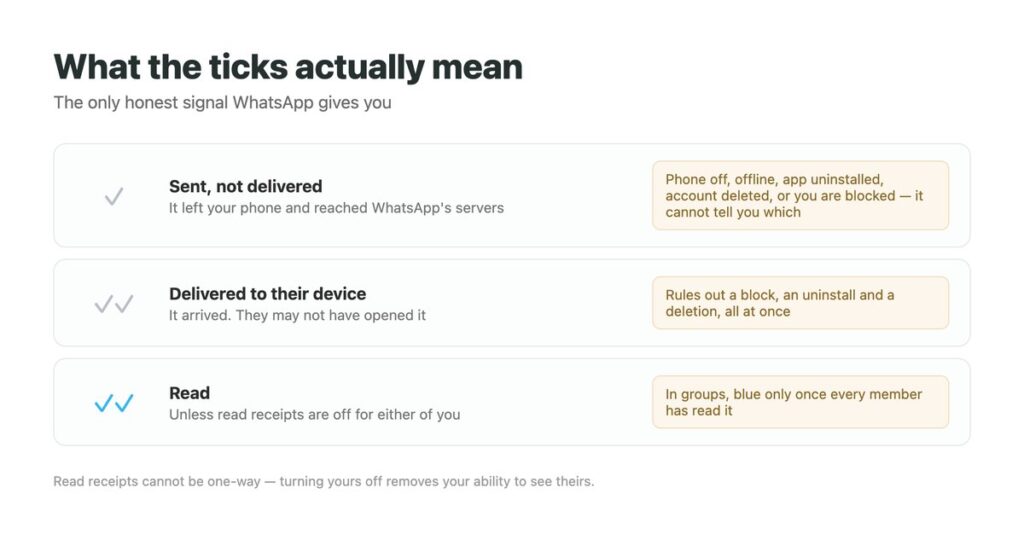
This is the single most useful thing to know, because the ticks are the only honest signal WhatsApp gives you.
- One grey tick – sent, not delivered. The phone is off, offline, the app is gone, or you are blocked. It does not distinguish between those.
- Two grey ticks – delivered to their device. They may not have opened it.
- Two blue ticks – read, unless read receipts are off for either of you.
- Read receipts cannot be one-way. Turning yours off removes your ability to see theirs.
- Group messages turn blue only when everyone in the group has read them.

When Someone Seems to Have Disappeared
A contact whose profile empties out generates more questions than anything else in the app, and there are four separate explanations that look nearly identical from the outside.
The short answer is that you cannot tell them apart with certainty. A shared group is the only place a deleted account becomes visible, and waiting a week is genuinely the most informative test available. The unavailable label covers the causes in detail, and the uninstalled-versus-deleted guide separates the two that look most alike.
- They tightened a privacy setting – by far the most common, and not about you.
- They uninstalled the app – temporary, and your messages will deliver when they return.
- They deleted the account – permanent, and only visible in a shared group.
- They blocked you – the assumption people jump to, and the hardest to confirm.
Group Settings Worth Knowing
Almost every “I cannot change this” question about groups is the same permission wearing a different hat.
- Edit group info controls the name, photo, description and icon together. Set to admins only by default in many groups – see changing the group photo.
- Send messages can be restricted to admins, turning a group into an announcement channel.
- Group names cap at 25 characters, which is why long ones get cut off in the chat list.
- Mentions reach muted members, which is the point of tagging everyone.
- Disappearing messages are set per group and apply to everyone in it.
Settings Worth Changing Today
A short list that solves most of the complaints people have about the app.
| If this bothers you | Change this | Where |
|---|---|---|
| Strangers seeing when you are online | Last seen and online | Privacy settings |
| Being added to random groups | Who can add me to groups | Privacy settings |
| Photos filling your camera roll | Media auto-download | Storage and data |
| A noisy group you cannot leave | Mute, and turn off mentions | In the chat itself |
| Losing everything if you change phone | Backup frequency and account | Chats, then backup |
| Account takeover risk | Two-step verification | Account settings |
Two-step verification is worth doing now rather than later. Securing your WhatsApp covers the rest of the account hygiene.
The Things WhatsApp Will Never Tell You
Being clear about the limits saves a lot of searching, because a great deal of content online promises information that does not exist.
- Who viewed your profile. Not exposed, to anyone, ever.
- Who blocked you. No notification, no indicator, in either direction.
- Who screenshotted a chat. No detection in normal chats.
- Whether a message was deleted or never sent. Both look the same.
- Who is behind an unknown number. Tracing a number is far more limited than the results suggest.
- Any app claiming to provide these is guessing, or collecting your login.

Personal WhatsApp vs WhatsApp Business
The two apps look similar and behave differently in ways that matter once customers are messaging you.
Business accounts get a catalogue, quick replies, labels, away messages and an API. The API is the part that changes things, because it makes automated replies possible – and it introduces a 24-hour service window, meaning you can reply freely within a day of a customer’s message but need an approved template after that.
- Quick replies and labels handle the repetitive part manually.
- Away messages cover the hours you are not there.
- The catalogue lets you send products inside a chat.
- The 24-hour window governs what you may send and when.
- Automation needs the API, not the standard business app.
When WhatsApp Is How Customers Reach You
DMpro connects WhatsApp Business alongside Instagram, TikTok, Telegram, Messenger and LinkedIn, answers in your own tone inside the service window, and keeps every thread in one place.
You describe the automation in plain English and the AI assembles it. Free plan with 250 conversations a month; see pricing.
- WhatsApp Business connected alongside five other channels
- Replies inside the 24-hour service window automatically
- Attachments, location and contact cards supported
- Product catalogue messages straight into a chat
- One searchable history per customer, not per app
- Customer questions answered outside working hours
- Works within WhatsApp’s own messaging rules
- No second phone or second app to watch
- Free plan, no card
- Business messaging only – it does not manage personal chats or groups
Conclusion
Most WhatsApp confusion comes from four independent privacy settings, one ambiguous tick, and a set of group permissions that are admin-only by default.
The app is deliberately built so you cannot confirm what someone else did. Once you accept that, the remaining questions have straightforward answers.
If WhatsApp is a channel customers use to reach you, it stops being a chat app and becomes an inbox – and inboxes need answering, not monitoring.
Start free with DMpro and reply automatically across WhatsApp and five more channels.
Automate your WhatsApp inbox