
Searches for WhatsApp automation return two kinds of result: vendor pages listing features, and download pages for tools that promise to message anyone at any volume. Neither explains the thing that decides what is possible, which is that WhatsApp itself allows some automation and forbids the rest.
There are three distinct routes, they cost very different amounts, and one of them ends with the number banned rather than the app removed. Knowing which one a tool belongs to is more useful than any feature comparison, because features that the platform does not permit are not features.
The rules are published rather than hidden, and they are worth reading before buying anything. The same is true of the privacy and account settings covered in our wider WhatsApp guide, where most of the confusion also comes from unofficial apps rather than from WhatsApp.
Key Takeaways
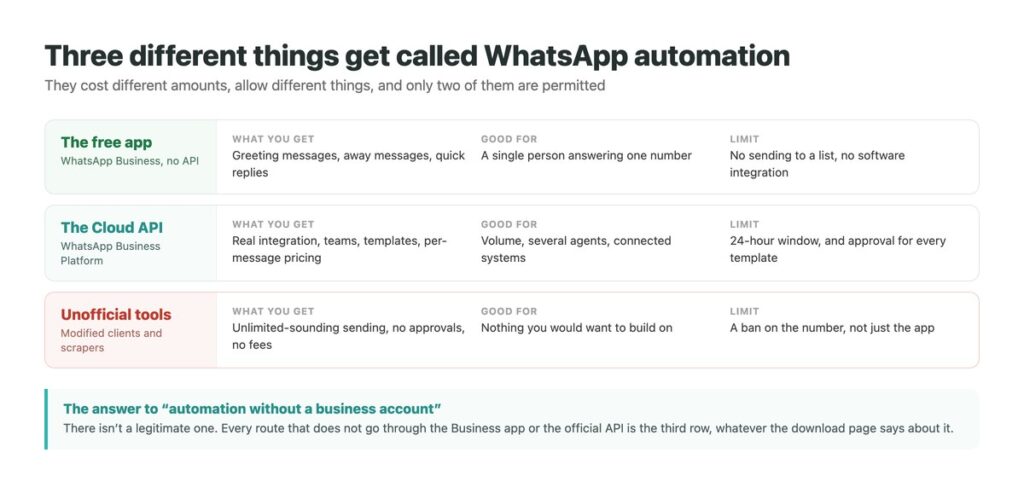
Three Things Wearing the Same Name
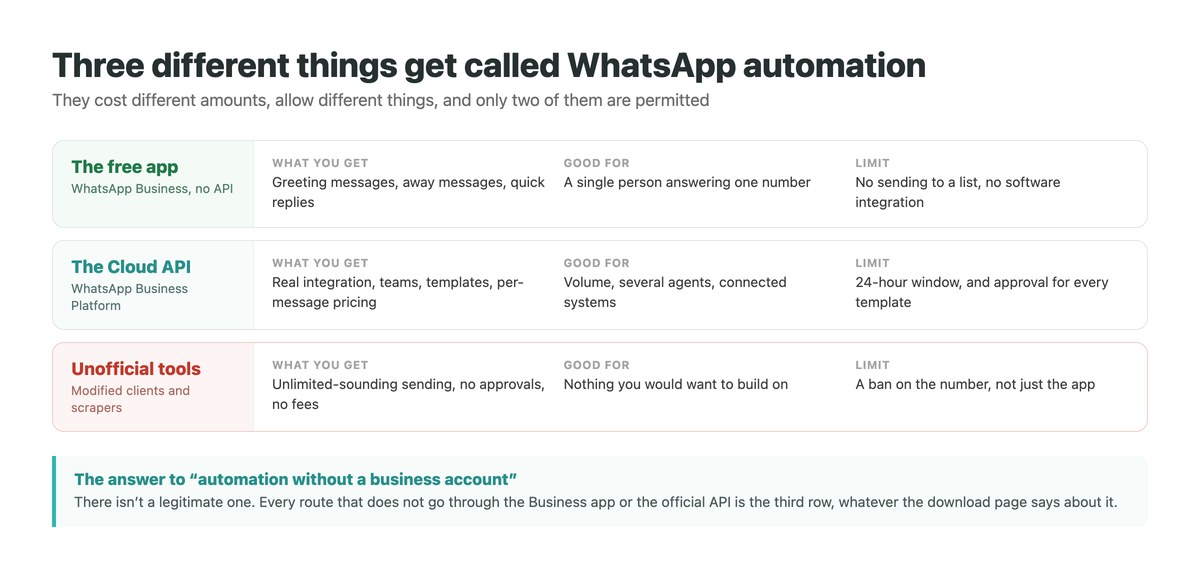
The first is the free WhatsApp Business app, which most people asking about automation already have and have not finished setting up. It automates the parts that matter most for a small operation and costs nothing.
The second is the WhatsApp Business Platform, usually met as the Cloud API. This is what people mean by automation in a software sense – a connection between WhatsApp and your own systems, several agents on one number, messages triggered by events elsewhere. It is priced per message and it comes with rules.
The third is a category of tools that sit outside both, sending through modified clients or automated browser sessions. They are the ones advertising unlimited sending and no approvals, and they are the reason this article needs a warning at the end rather than the middle. They are the same category of software behind the apps that claim to freeze your last seen, if you have met them in that context.
What the Free App Already Does
Before evaluating any product, it is worth knowing what you get without one. The WhatsApp Business app includes three automation features officially, and together they cover a surprising amount of what small businesses ask for.
Greeting messages go out automatically to someone starting a conversation, so a first-time enquiry is answered instantly rather than whenever you next open the app. Away messages cover the hours you are not working, which is the difference between a customer thinking you are closed and thinking you are unresponsive. Quick replies are saved answers to the questions you get repeatedly, pulled up with a keyboard shortcut instead of retyped.
What the free app cannot do is equally clear: it will not connect to your other software, it will not let a team share one number properly, and it will not send to a list of people who have not written to you. Those needs are what the API exists for, and reaching for it before you have exhausted the free features is a common and expensive mistake. If you are comparing products at this stage, our rundown of messaging tools by what they are for is a better starting point than a feature grid.
The Three Routes Compared
Choose the row that matches the problem rather than the one with the most features.
| Free Business app | Cloud API | Unofficial tools | |
|---|---|---|---|
| Automated first reply | Yes | Yes | Yes |
| Connects to your systems | No | Yes | Sometimes |
| Several agents on one number | Limited | Yes | No |
| message a cold list | No | Templates only | Advertised, but prohibited |
| Cost | Free | Per message | The account |
| Permitted by WhatsApp | Yes | Yes | No |
The 24-Hour Window Behind Everything
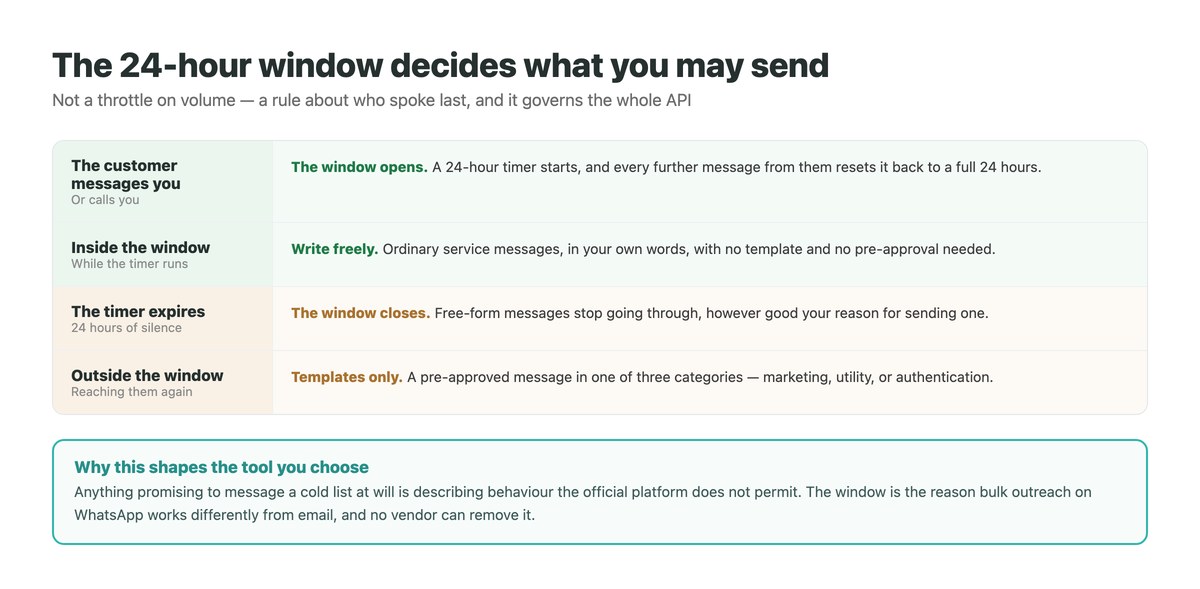
This single rule shapes every product built on the official API, and understanding it explains most of what tools can and cannot promise.
Meta’s documentation describes it as a 24-hour timer that starts when a WhatsApp user messages you or calls you. While it runs, you can reply freely, in your own words, with no approval needed. Every further message from them resets it to a full 24 hours.
When it expires, free-form messaging stops. You cannot reach that person again with an ordinary message no matter how reasonable the reason. The window is about who spoke last rather than about volume, which is why WhatsApp behaves so differently from email as an outbound channel.
Template Messages, and Why You Cannot Skip Them
Outside the window, the only thing that sends is a pre-approved template message. Meta groups these into three categories – marketing, utility and authentication – and each template is submitted and reviewed before it can be used.
This is the part that surprises people arriving from email marketing. You cannot write a one-off message to a lapsed customer at will; you write a template, wait for approval, then send it. The upside is that the review is what keeps WhatsApp usable as a channel at all, since it is the reason people’s WhatsApp is not full of the promotional mail their email is.
It also means the honest answer to whether you can blast a purchased list is no. Not as a matter of tooling but of permission, and any product claiming otherwise is describing the third route rather than the second.
What to Ask a Vendor Before Buying
Six questions that separate the two legitimate routes from the third, whatever the marketing page says.
| Question | The answer you want | What a bad answer sounds like |
|---|---|---|
| Do you use the official Cloud API? | Yes, with a Business Solution Provider | We use our own connection method |
| How is a template approved? | Submitted to Meta for review | No templates needed with us |
| What happens after 24 hours? | Template messages only | You can message any time |
| Can I message a bought list? | No | Yes, unlimited |
| Who owns the number? | You do | We provide the number |
| What is the per-message cost? | A clear rate by category | Unlimited sending, flat fee |
Automation Without a Business Account
This is among the most common things people search for on this topic, and it deserves a direct answer rather than a workaround: there is no legitimate route.
Automation on a personal WhatsApp account means a modified client or a script driving the app, and both are outside the Terms of Service. WhatsApp’s page on temporarily banned accounts ties bans directly to unofficial versions and to scraping, and states that continuing after a temporary ban may make it permanent. The ban attaches to the phone number, so removing the software afterwards does not undo it.
The practical answer is that the free Business app is free. It installs on the same phone, keeps your number, and provides the automated first reply that most people wanting personal-account automation were actually after. It is a smaller step than it sounds and it is the difference between building on the platform and building against it – a distinction our notes on keeping a WhatsApp account secure come back to.
Where Automation Genuinely Helps
Stripped of the vendor claims, the useful applications are narrower and more valuable than unlimited sending would be.
The first reply is the clearest win. Answering within seconds rather than hours changes outcomes measurably, and it is the one thing every tier can do. Routing is the second: getting a message to the right person without the customer repeating themselves. The third is keeping one history per customer across channels, so a conversation that started on Instagram and continued on WhatsApp reads as one conversation – the same argument behind treating DMs as a CRM problem rather than an inbox problem.
What automation does not do is manufacture demand – the one lever that buys inbound conversations is an ad that opens a chat, and even that only works because the customer sends the first message. A fast, well-routed reply to someone who wanted to talk to you is worth a great deal. The same machinery pointed at people who did not is what the rules above exist to prevent – and it is why cold messaging keeps failing on every platform that has tightened up, not only this one.
One Number, One Inbox, Every Channel
Most businesses do not have a WhatsApp problem; they have a several-inboxes problem. The customer messages on Instagram, follows up on WhatsApp, and expects whoever answers to know what was already said.
DMpro keeps those threads together. First replies go out immediately on each channel, conversations carry their history between them, and a person can take over mid-thread without asking the customer to start again.
- Instant first replies on WhatsApp, Instagram and TikTok
- One customer history, even when the channel changes mid-conversation
- Routing rules based on what the message actually contains
- Team access without sharing a phone or an account password
- Working-hours handling, so out-of-hours enquiries still get an answer
- No customer waiting because it arrived on the wrong channel
- History follows the person rather than the app
- Built on what the platforms permit rather than around it
- It cannot send to a cold list – no compliant tool can
Conclusion
The word covers three routes and the differences matter more than any feature list. The free Business app automates greetings, away messages and saved replies, which is most of what a small operation needs and costs nothing. The Cloud API adds real integration, teams and templates, priced per message.
Both live under the 24-hour window: free-form messaging while the customer’s timer runs, approved templates once it stops. That rule is not a vendor limitation and no tool can remove it.
The third route is the one advertising unlimited sending, and it ends with the number banned rather than the software uninstalled. If you are on a personal account, moving to the free Business app is a smaller step than it looks and gets you the automated first reply you wanted anyway.
WhatsApp, Instagram and TikTok in one inbox, with one history per customer.
Try it on your channels