
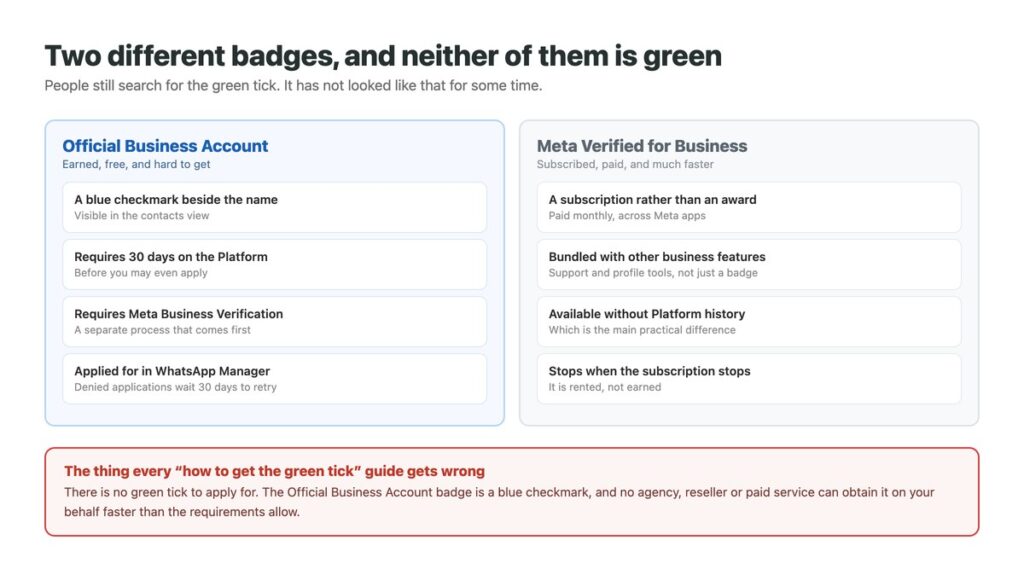
Searching for the WhatsApp green tick returns a great many pages explaining how to get something that no longer looks like that. The verification badge on a business account is a blue checkmark, and the name stuck because the feature changed and the search habit did not.
More usefully, there are now two different badges with two entirely different routes. One is earned over at least thirty days and cannot be bought. The other is a subscription. They look similar to a customer and are nothing alike to apply for.
Which one you want depends less on prestige than on how long you are willing to wait. Both sit on top of the platform arrangements covered in our guide to WhatsApp automation, and neither changes what our notes on sending to a list describe.
Key Takeaways
What the Badge Is Now
An Official Business Account is a business phone number that Meta has confirmed belongs to an authentic business. Meta’s documentation describes what customers see: a blue checkmark beside the name in the contacts view.
There is no green tick to apply for, which matters because a whole industry of resellers advertises exactly that. Nobody can obtain this badge on your behalf faster than the requirements allow, because the requirements include a waiting period and a verification process that are not negotiable.
It is also worth knowing what the badge does not do. It does not raise your messaging limits, does not affect pricing, and does not change what you are allowed to send. It signals authenticity to the person receiving your message, and that is the whole of its function – which matters most on a number several people answer, as our guide to sharing one WhatsApp number covers.

The Five Requirements
All of these have to be true before an application will be considered, and they are worth checking in order because the first two account for most refusals.
The business must have been registered on the WhatsApp Business Platform for at least thirty days. The business portfolio must have passed Meta Business Verification, which is a separate process and the one that actually stalls people. The number must comply with WhatsApp’s messaging policy, which in practice means a clean quality history. Two-step verification must be enabled on the number. And the display name customers see must be approved.
None of these is difficult on its own. What catches businesses out is applying before all five hold, because a refusal is not a free retry.

Applying, and Not Wasting a Month
The order matters more here than in most processes, because of the retry penalty.
Complete Meta Business Verification first
It validates the portfolio that owns the number and is prerequisite rather than parallel. Starting here avoids the most common refusal.
Check the thirty days have actually passed
Counted from registration on the Platform, not from when you started using WhatsApp Business. It is easy to misremember which date applies.
Enable two-step verification on the number
The smallest requirement on the list and the one most often left switched off by accident.
Get the display name approved before applying
The name customers see goes through its own review. An unapproved name will hold up the badge application behind it.
Submit from WhatsApp Manager
Phone number settings, then Submit Request under the Official Business Account section. There is also an API for managing this programmatically if you run several numbers.
The Thirty-Day Penalty for Applying Too Early
A refused application cannot be resubmitted for thirty days. That single rule should change how you approach the whole thing.
The instinct is to apply and see what happens, on the reasoning that a refusal costs nothing. Here it costs a month, and the reason for a refusal is not always spelled out clearly enough to fix confidently – so a speculative application can easily turn into two months of waiting to correct something that would have taken an afternoon to check first.
The productive version is to treat the five requirements as a checklist to complete rather than a set of conditions to test. Everything on it can be verified from your own account settings before you submit anything.
Official Business Account or Meta Verified
They produce a similar impression on the customer and are entirely different products.
| Official Business Account | Meta Verified for Business | |
|---|---|---|
| What it costs | Nothing | A monthly subscription |
| Time before you can have it | 30 days minimum, plus verification | Much shorter |
| Business Verification needed | Yes, first | Part of the process |
| If you stop paying | n/a – it is not paid for | The badge goes |
| Other things included | The badge only | Support and profile features |
| Raises messaging limits | No | No |
What the Badge Does and Does Not Change
Worth reading before deciding how much effort this deserves.
| Does verification change it? | |
|---|---|
| How customers perceive the number at first contact | Yes – this is the whole point |
| Your messaging tier | No |
| What you are charged per message | No |
| Which templates get approved | No |
| Your quality rating | No |
| Whether people block you | No – that depends on what you send |
The Paid Route, and When It Makes Sense
Meta Verified for Business is a subscription rather than a status you earn. It bundles a verified badge with support and profile features across Meta’s apps, and it does not ask you to have been on the WhatsApp Business Platform for a month first.
That last point is the real difference. A business launching now, wanting customers to trust the number immediately, cannot get an Official Business Account for at least thirty days no matter what it does. The subscription route is available straight away.
The trade is that it is rented. Stop the subscription and the badge stops with it, whereas an Official Business Account persists as long as you keep meeting the requirements. Neither is better in general; the subscription buys time and the free route buys permanence.
Why the Badge Matters Less Than It Feels Like It Should
Businesses tend to treat verification as the thing standing between them and being taken seriously, and it is usually not.
The badge changes nothing about deliverability, cost, messaging tiers or what you are permitted to send. What actually determines whether people engage with your messages is quality rating – built from whether recipients block and report you – and that is affected by what you send rather than by any badge next to your name. A verified account sending unwanted marketing gets blocked exactly as fast as an unverified one, and the badge does not slow the resulting drop through the messaging tiers.
The realistic reading: apply when you qualify, because it costs nothing and helps a little at the moment of first contact. Do not treat it as a growth lever, and do not pay a reseller who claims to shortcut a process that has a thirty-day floor built into it.
What Customers Actually Judge You On
A badge helps at the instant someone reads your name. Everything after that is decided by whether the reply comes in seconds or hours, and whether the person answering knows what was said last time.
DMpro answers on arrival across WhatsApp, Instagram and TikTok, keeps one history per customer rather than one per app, and routes the conversations needing judgement to a person before the customer notices a delay.
- First replies sent on arrival, whatever the hour
- One customer history across WhatsApp, Instagram and TikTok
- Routing so the messages needing a person reach one
- Team access without passing a handset around
- Sending paced to protect the quality rating that badges do not affect
- Speed, which customers notice far more than a checkmark
- Context that survives between conversations
- Nothing lost because it arrived on a different channel
- It cannot obtain a verification badge for you – nothing can
Conclusion
The green tick is a search term rather than a thing. The Official Business Account badge is a blue checkmark, and there is no version of it that a reseller can arrange faster than Meta’s own requirements permit.
Five conditions have to hold before you apply: thirty days on the Platform, Meta Business Verification passed, policy compliance, two-step verification enabled, and an approved display name. A refusal costs another thirty days, which makes speculative applications expensive.
Meta Verified is the paid alternative and its real advantage is time rather than status. And neither badge raises a messaging limit, lowers a cost, or changes what you are allowed to send.
Instant replies and one customer history across every channel you use.
See the shared inbox