
Businesses on the WhatsApp Business Platform do not get to message as many people as they like. There is a ceiling on how many unique customers you can reach in a day, it starts low, and it rises through five tiers.
Most of the confusion about it comes from counting the wrong things. The limit is on unique phone numbers rather than messages, it applies outside conversations rather than inside them, and it sits on your whole portfolio rather than on each number you own.
The other half is quality rating, which is what actually moves you between tiers and what quietly holds businesses at one for months. Neither of these applies to the free app, which has different constraints entirely – covered in our guide to what WhatsApp automation permits. The equivalent rules on Instagram work differently again, as our notes on the Instagram messaging API set out.
Key Takeaways
What the Limit Is Counting
The tier is the maximum number of unique WhatsApp phone numbers your business can deliver messages to within a rolling 24 hours, outside customer service windows. Three parts of that sentence do the work.
Unique numbers, so three templates to the same person consume one slot rather than three. Rolling, so it is not a midnight reset but a moving window. And outside service windows, so everything you send in reply to someone who wrote to you is uncounted – which for most businesses is the majority of what they send.
It is also a portfolio limit rather than a per-number one. Registering a second number does not buy a second allowance, which is the first workaround people reach for and it does not work.

Getting Off Tier One
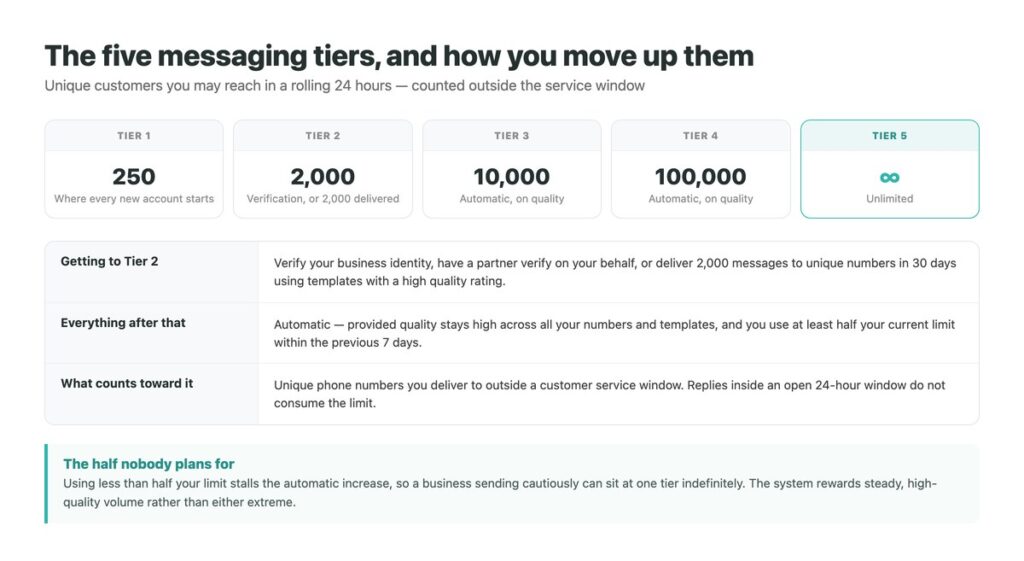
Meta’s documentation gives three routes to tier two, and you only need one. Verify your business identity. Have a partner complete verification on your behalf. Or deliver 2,000 messages to unique numbers within a 30-day moving period, outside service windows, using templates with a high quality rating.
The third route sounds like the easy one and is the slowest, because a new number sending 250 a day needs to sustain that for over a week while keeping quality high – and quality is at its most fragile before you have any history to absorb a bad day.
Business verification is the route worth taking. It is administrative rather than performance-based, it does not depend on how customers react to your messages, and it is done once.
The Five Tiers
Unique customers reachable in a rolling 24 hours, outside service windows.
| Tier | Unique customers per day | How you get there |
|---|---|---|
| 1 | 250 | Where every new portfolio starts |
| 2 | 2,000 | Verification, or 2,000 delivered in 30 days |
| 3 | 10,000 | Automatic, on quality and usage |
| 4 | 100,000 | Automatic, on quality and usage |
| 5 | Unlimited | Automatic, on quality and usage |
The Rule That Punishes Caution
Once you are at tier two, increases happen on their own – provided two conditions hold. Quality has to stay high across every number and template in the portfolio, and you have to use at least half your current limit within the previous seven days.
That second condition catches careful businesses. A company sending 400 messages a day against a 2,000 limit is using a fifth of it and will sit at tier two indefinitely, however good its quality rating is. Nothing warns you; the tier simply never moves.
The practical reading is that the system rewards steady, high-quality volume rather than either extreme. Sending nothing keeps you where you are, and sending badly moves you backwards – because tiers can go down as well as up when quality drops.

Quality Rating, and What Actually Damages It
Quality is built from how recipients react rather than from anything about the message itself. Blocks and reports are what damage it, and a template people do not want produces both.
The consequence that surprises people is that it is a portfolio-level signal. One badly received marketing template can drag the rating for every number and every template you run, including the utility messages customers were perfectly happy to receive. Pacing marketing sends separately from operational ones is not fussiness; it is protecting the messages that matter most.
The single most effective protection is making opting out easy. A person who cannot leave blocks instead, and a block is exactly the signal the rating is built from – so the friction you add to leaving comes straight back as a lower ceiling.
What Happens When You Hit It
Reaching the ceiling is undramatic and easy to miss. Further template sends to new numbers simply stop going through for the rest of the rolling window, and what you see is delivery failures rather than a warning that explains itself.
Because the window rolls rather than resetting, capacity returns gradually as the oldest sends age out, which makes the recovery feel arbitrary if you are watching it. A campaign fired all at once at nine in the morning frees up at nine the next morning, one hour at a time.
Nothing about hitting the limit damages your standing – it is a cap, not a penalty, and quality rating is unaffected by bumping into it. The mistake worth avoiding is treating the failures as a fault and retrying them, which achieves nothing while the window is full. If several people are watching those sends, our notes on sharing one number properly cover keeping that visible to everyone.
Common Misreadings of the Limit
Each of these is a real assumption businesses plan around before discovering otherwise.
| The assumption | What is actually true |
|---|---|
| It limits how many messages I can send | It limits unique people, in a rolling 24 hours |
| It applies to my replies too | No – anything inside an open service window is uncounted |
| A second number doubles it | No – the limit is on the portfolio |
| It resets at midnight | It is a rolling window, not a calendar day |
| Sending less is always safer | Under 50% usage stalls the automatic increase |
| Tiers only go up | They can drop when quality falls |
Planning Against the Ceiling
The useful exercise is working out which of your sends are actually constrained. Replies are not, so a support-heavy business may never approach its tier at all. Scheduled utility messages – reminders, confirmations, updates – are constrained but predictable, and can be spread across days rather than fired at nine in the morning.
Marketing is the one that collides with the ceiling, because it is naturally bursty and naturally the least welcome. Splitting a campaign over several days keeps you inside the tier and produces a better quality outcome than sending everything at once.
And the route around the ceiling that does not involve the ceiling at all: conversations customers start themselves are uncounted and free. Everything that produces an inbound message – a chat button, a click-to-WhatsApp ad, a link – buys reach that no tier restricts, which is a better lever than waiting to be promoted to the next one. The mechanics of sending to a list in the first place are in our guide to WhatsApp bulk messages.
The Sends That Never Touch the Limit
Every reply to a customer who messaged you first is uncounted, unbilled and unrestricted. For most businesses that is the majority of the volume, and the constraint is not the tier – it is whether anyone answers quickly enough for the conversation to stay open.
DMpro answers on arrival across WhatsApp, Instagram and TikTok, keeps the history with the customer rather than the device, and routes the conversations that need a person to one.
- Instant replies inside the service window, where nothing is counted
- One inbox for WhatsApp, Instagram and TikTok conversations
- Routing so the messages needing judgement reach a person
- History that follows the customer across channels
- Team access without sharing a handset or a password
- The uncounted, unbilled half of the volume is handled well
- Conversations stay open because replies are fast
- No customer waits because it arrived on the wrong channel
- It cannot raise your messaging tier – only quality and usage do
Conclusion
Five tiers, starting at 250 unique customers a day and rising to unlimited. The count is unique phone numbers rather than messages, it is a rolling 24 hours rather than a calendar day, and it applies to your whole portfolio rather than to each number.
Getting off the first tier is the only manual step, and business verification is the version of it that does not depend on how customers react to you. Everything above is automatic while quality stays high and you use at least half your allowance.
The two assumptions that cost most are that a second number buys a second allowance, and that sending cautiously is always safe. Neither is true, and the second is why careful businesses stall.
Fast replies inside the service window, across every channel, from one inbox.
See the shared inbox