
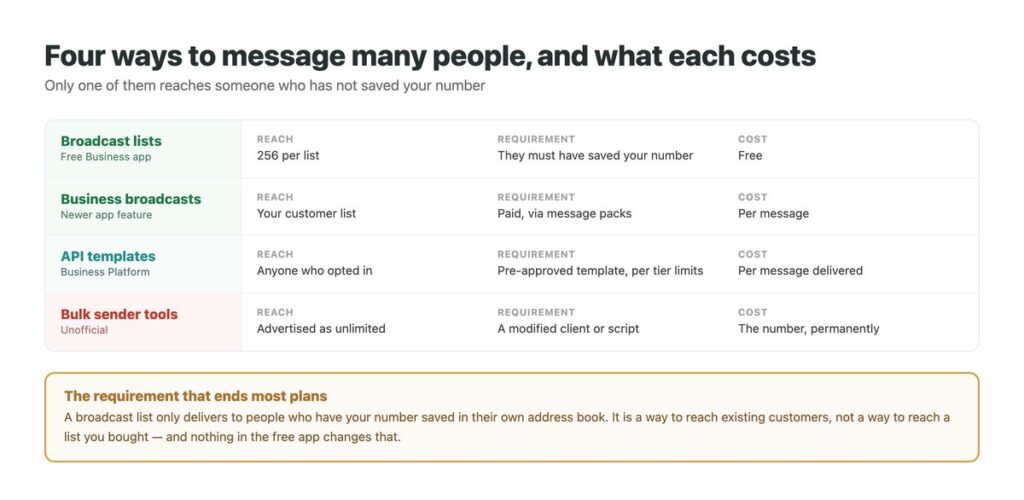
Sending one message to a lot of people on WhatsApp is possible in four different ways, and they are so unlike each other that treating them as versions of the same thing is where most plans go wrong.
One of them is free and reaches almost nobody you were hoping to reach. One is paid and reaches whoever agreed to hear from you. One is advertised as unlimited and ends with the number banned. The fourth is a newer paid feature inside the app itself.
The distinction that matters most is not price – it is who each route is permitted to reach, and that is decided before any tool gets involved. What WhatsApp allows in general is covered in our guide to WhatsApp automation; this is the sending half of it.
Key Takeaways
Broadcast Lists, and the Rule That Undoes Them
The free WhatsApp Business app has broadcast lists: you pick recipients, write once, and each person receives it as an ordinary one-to-one message rather than a group. WhatsApp’s own page puts the ceiling at 256 contacts per list.
Then comes the condition that decides everything: all contacts in the broadcast list must have saved your number in their address book. If they have not, the message simply does not reach them, and nothing tells you which ones were dropped.
So a broadcast list is a way to talk to people who already know you well enough to have added you – existing customers, a regulars list, people who messaged you and saved the number. It is not, and cannot be made into, a way to reach a list you assembled. That is not a limitation of the free tier; it is the point of the feature.

Business Broadcasts, the Newer Paid Route
WhatsApp has since added business broadcasts inside the Business app, paid for through message packs rather than being free. It sits between the broadcast list and the full platform: more reach than the former, far less setup than the latter.
It suits a business that has a genuine customer list and no appetite for an API integration – a shop announcing opening hours over a holiday, a clinic with appointment reminders. You are paying per message rather than per seat, so the cost scales with how much you send.
It is worth checking the current pricing rather than trusting any figure you read, including here. WhatsApp has changed the billing model once already and the message-pack structure is newer than most of the writing about it.
API Templates: The Only Route to People Who Have Not Saved You
On the WhatsApp Business Platform you can message someone outside an open conversation, but only with a pre-approved template, and only if they opted in to hear from you. Opt-in is a policy requirement rather than a technical one, which means nobody stops you sending – the consequences arrive later, through quality rating.
Templates come in three categories: marketing, utility and authentication. The category is not a label you choose freely; Meta reviews it, and a marketing message submitted as a utility one gets recategorised or rejected.
This is the route businesses mean when they say bulk WhatsApp, and it carries a ceiling on how many unique people you may reach in a day – the subject of our guide to WhatsApp messaging limits.
What Each Route Can Actually Do
Read the second column first. It eliminates most of the table for most businesses.
| Route | Reaches people who have not saved you? | Cost | Practical ceiling |
|---|---|---|---|
| Broadcast list | No | Free | 256 per list |
| Business broadcast | Your customer list | Message packs | Set by what you buy |
| API templates | Yes, if they opted in | Per message delivered | Your messaging tier |
| Bulk sender tool | Advertised as yes | The account | None, until the ban |
What You Are Actually Charged For
WhatsApp’s pricing is per message delivered rather than per conversation – a change from the older model, which is why a lot of published advice on this is now wrong. Charging happens on delivery, not on sending, so an undelivered message is not billed.
Marketing, utility and authentication templates are charged, with rates varying by market and volume discounts on the latter two. Service messages – your replies inside an open 24-hour window – are free, however many you send.
There is one more free entry point that almost nothing mentions: messages sent within 72 hours of someone clicking an ad that opens WhatsApp, or a Facebook Page call-to-action button, are not charged in any category. If you run click-to-WhatsApp ads, that is a meaningful window and most advertisers let it expire without using it.

Sending to a List Without Damaging the Number
Quality rating is the thing that decides your future reach, and these are what protect it.
Collect a real opt-in and keep the record
Not a bought list, not scraped numbers, and not people who once messaged you about something else. The record matters when a template gets reviewed.
Send utility before marketing
Order updates and reminders get a far better reception than promotions, and they build the quality history that marketing sends later draw on.
Start small and widen
Your first tier is 250 unique people a day. Sending to everyone at once on day one is how a new number gets its quality rating damaged before it has any history.
Make opting out obvious and instant
Someone who cannot leave blocks you instead, and blocks are what the quality signal is built from.
Watch replies, not deliveries
A delivered template that nobody answers is a cost. The point of reaching people on WhatsApp is that they can reply – see our notes on handling what comes back.
What Counts as a Real Opt-In
Opt-in is a policy requirement rather than a technical one, so nothing blocks a bad one at send time. The cost arrives later, as quality rating.
| What you have | Is it an opt-in? | Why |
|---|---|---|
| They ticked a box asking for WhatsApp updates | Yes | Specific to the channel, and recorded |
| They messaged you once about an order | No | Consent to a conversation, not to marketing |
| They gave you a number at checkout | No | A phone number is not permission to message |
| They follow you on Instagram | No | Different platform, different consent |
| You bought the list | No | Nobody agreed to anything |
| They joined via a click-to-WhatsApp ad | For that conversation | Ask before adding them to a broadcast |
Why the Bulk Sender Tools End Badly
Search for bulk WhatsApp sender and most of what returns is a desktop application that drives WhatsApp Web or a modified client, promising unlimited sending with no templates and no approvals.
They work, briefly. WhatsApp’s page on temporarily banned accounts ties bans directly to unofficial versions and to scraping, and warns that continuing after a temporary ban may make it permanent. The ban attaches to the phone number rather than the software, so uninstalling afterwards changes nothing.
The part that makes this worse than it sounds is that the number is usually the business’s real number, printed on the shopfront and the invoices. Losing it is not losing a tool. It is the same reasoning behind the apps discussed in our guide to freezing last seen – a small convenience bought with the account.
The Honest Summary
If the people you want to reach have saved your number, broadcast lists do the job for nothing and there is no reason to spend anything.
If they have not, and they opted in, the platform is the only compliant route: templates, per-message charges, and a daily ceiling on unique recipients. If they have not opted in either, there is no route at all – not an expensive one, not a clever one. That is the answer, and no product changes it.
The interesting consequence is that the cheapest large-scale route is not a sending tool at all. It is getting people to message you first, which is free to reply to and free for 72 hours after a paid click – which is why the ads exist and why cold outreach keeps losing to it.
Every Reply, in One Place
Sending is the easy half and the half that gets all the attention. What decides whether a broadcast was worth it is how many people replied and whether anybody answered them – which is where a shared number usually falls over.
DMpro brings the replies from WhatsApp, Instagram and TikTok into one inbox, answers the first message immediately so nobody waits, and keeps one history per customer rather than one per app.
- Replies to a broadcast collected in one inbox rather than a phone
- Automatic first response so nobody waits for you to notice
- One customer history across WhatsApp, Instagram and TikTok
- Routing so the replies worth answering surface first
- Team access without passing a handset around
- A broadcast that works does not bury you
- Replies are answered in seconds rather than hours
- The same customer is recognisable next time
- It cannot send to people who never opted in – nothing compliant can
Conclusion
Four routes, and one rule decides which are open to you. A broadcast list is free, capped at 256, and only reaches people who saved your number – which rules it out for anything resembling a marketing list.
Business broadcasts and API templates are the paid routes, charged per message delivered by category, with service replies free and a 72-hour free window after an ad click that most businesses never use.
The bulk sender tools are the fourth route and the one that ends with the business’s own number banned. If the people you want to reach never opted in, there is no fourth option – and the productive move is to give them a reason to message you first.
Broadcast replies, DMs and Instagram messages in one inbox.
See how replies are handled