
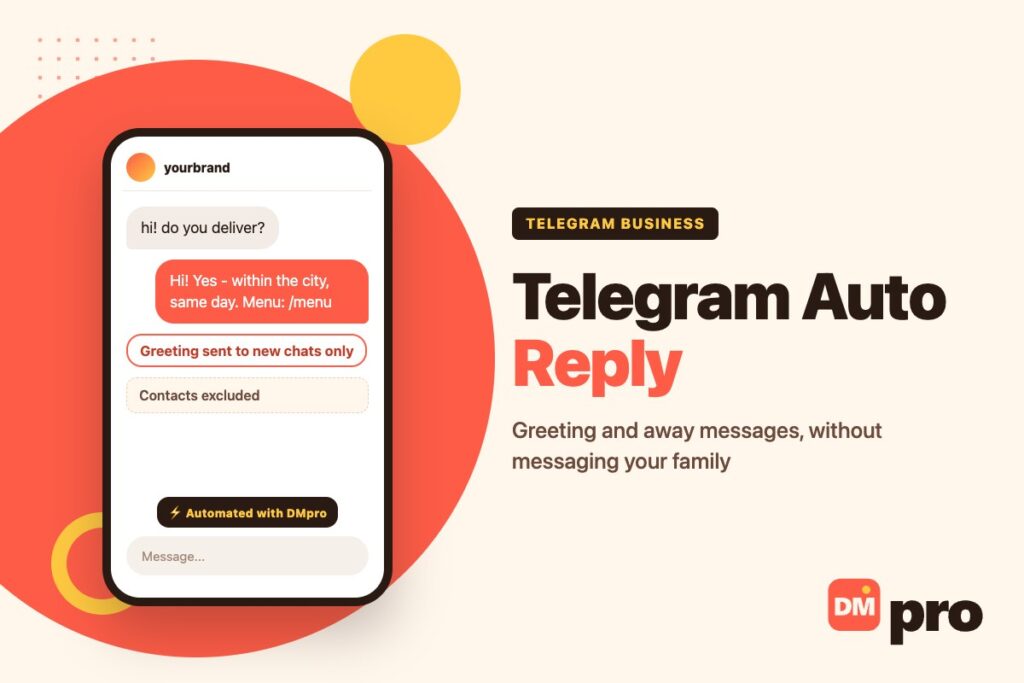
Telegram has proper automatic replies, and almost nobody using it for business has switched them on. They live in Telegram Business, they take about five minutes to set up, and they include something most messaging apps get wrong: precise control over who receives them, so your greeting never lands on your mother.
This guide covers all four ways Telegram answers for you – greeting messages, away messages, quick replies and connected bots – with the exact switches behind each one. Everything here comes from Telegram’s own Business announcement and its developer documentation, which is where the settings are described precisely.
One prerequisite before anything else: Telegram Business features come with Telegram Premium, and they sit in Settings, under Telegram Business. If that entry is missing, that is why.
Key Takeaways
Turning On Telegram Business
Business features are part of Telegram Premium rather than a separate product or a separate app. Open Settings, then Telegram Business, and you will find opening hours, location, a custom start page, quick replies, greeting messages, away messages, chat links and chatbots in one list.
Set Opening Hours First
Two of the automations depend on them. Hours are stored with a time zone, so customers see whether you are open in their own reading of the clock, and the away message can simply follow them instead of you scheduling anything by hand.
Then the Start Page
The start page is what someone sees in an empty chat before they type – your own text and sticker instead of Telegram’s default. It is not an automatic reply, but it is the first thing a new customer reads, and it costs nothing to fill in.
Greeting Messages
A greeting is sent to people who write to you for the first time. It is the Telegram equivalent of an instant reply, and it has one setting that makes it more useful than most.
The Inactivity Period
You can specify a number of quiet days after which the greeting is allowed to send again. So a customer who comes back three months later is greeted properly, while someone messaging twice in a week is not greeted twice. Pick a period longer than your usual conversation – two or three weeks suits most businesses.
What to Put in It
What you do, in one line
A stranger has just opened a chat with a name they half-recognise. Tell them what they have reached.
When they will hear back
A real number, and one you can meet. “We answer within a few hours, Monday to Friday” beats “we reply as soon as possible”.
One question
The greeting is a message, not a sign. End it with something they can answer in three words.
A quick reply shortcut
If you have a menu, a price list or a booking link saved as a quick reply, mention it here so the next step is obvious.
Away Messages
An away message covers the hours your business is shut, a holiday, or simply the times you are not at the phone. Telegram gives it three schedules and one extra condition.
The Three Schedules
Always
Every message gets the reply. Useful when the account is a broadcast point rather than a conversation, or while you are away indefinitely.
Outside working hours
Follows the opening hours you set, including the time zone. Set the hours once and the away message manages itself all year.
A custom date range
A start and an end date – the holiday setting. It stops on its own, which is the part people forget to do manually.
The Offline-Only Switch
Telegram can also restrict the away message to times when you are genuinely offline, rather than sending it whenever the schedule says so. That avoids the situation everyone has been on the receiving end of: an “I’m away” message arriving while the person is visibly typing.
What to Write
Say when you are back and give one thing they can do meanwhile, the way a good away message does. “We’re closed until Monday 9am. Send your order number and we’ll pick it up first thing.” An away message that only apologises wastes the one message you are guaranteed to have read.
Keeping Automations Away From Friends and Family
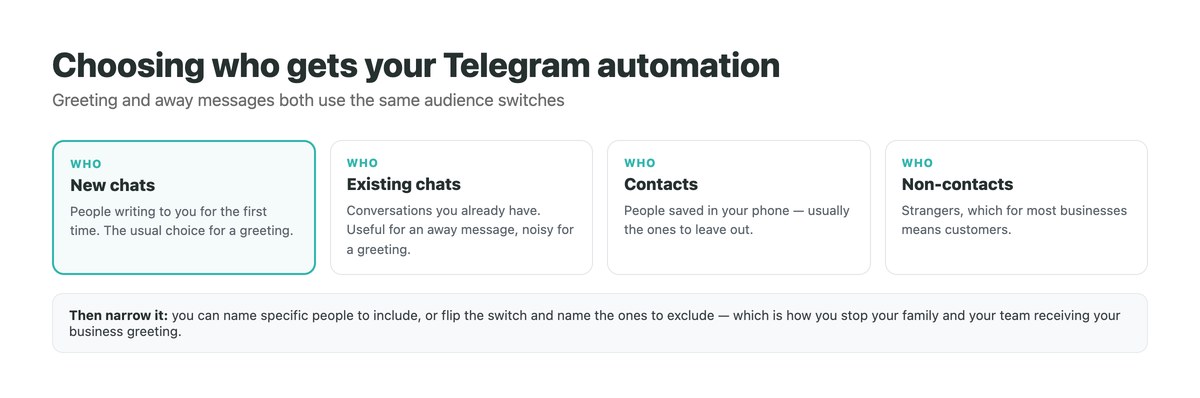
This is the part Telegram does better than its competitors, and the part most people never open. Both the greeting and the away message let you choose the audience precisely.
The Four Switches
You can target new chats, existing chats, contacts and non-contacts in any combination. For most businesses the answer is new chats and non-contacts: strangers get the greeting, and the people already in your phone do not.
And the List
On top of the switches you can name specific people – either as the only ones who should receive it, or, by flipping it round, as the ones to exclude. That exclusion list is what stops your team, your suppliers and your family getting a business greeting every time they message you after a quiet fortnight.
Why This Matters More Than It Sounds
Telegram business accounts are personal accounts with business features turned on. There is no separate work profile, so the audience settings are the only thing separating your customers from everyone else in your chat list. Set them before you turn the automations on, not after.
Quick Replies
Quick replies are saved messages you send by hand – the fastest way to answer the questions that arrive daily without retyping the answer.
How They Work
Each quick reply has a shortcut name and can hold several messages at once, with formatting, links, stickers, media and files – the same idea as Instagram quick replies, with fewer restrictions. Type / in the message box and a panel shows all of them; one tap sends or edits. Telegram notes this works in private chats only, not groups.
What to Save
The price list
As a formatted message or a PDF, so it never gets retyped differently twice.
The menu, schedule or catalogue
Anything customers ask for by name – and anything easier to send than to describe.
Directions
Address, nearest landmark, parking. Three lines that save a conversation every week.
The awkward one
Your refund or cancellation policy, written calmly once, so it is never written in irritation later.
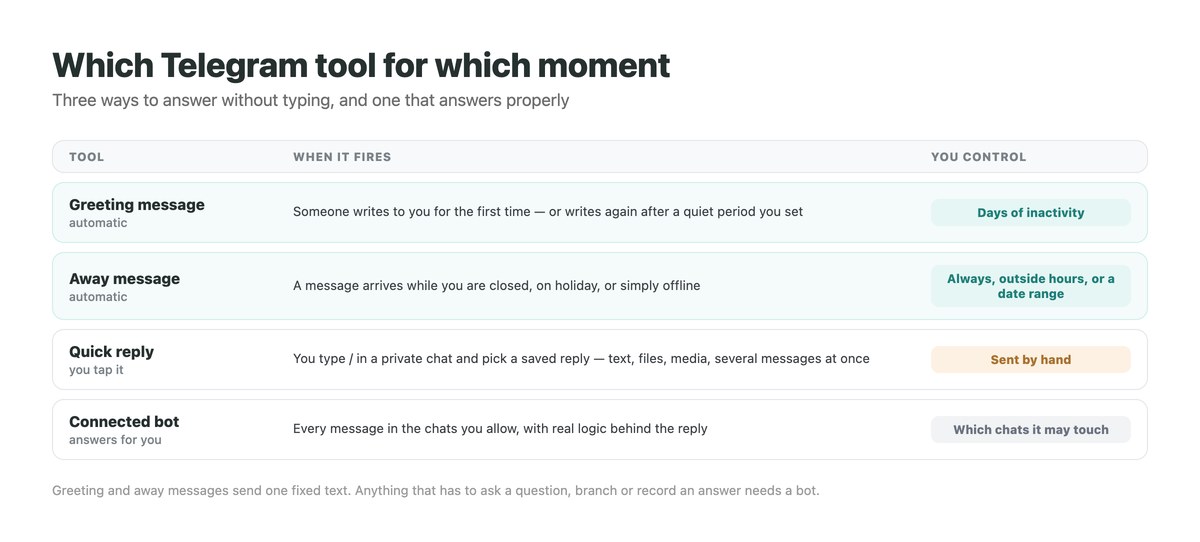
Which Telegram Tool for Which Job
Match the job to the tool before building anything.
| What you need | Use | Limitation |
|---|---|---|
| Greet first-time customers | Greeting message | One fixed text, no branching |
| Cover nights, weekends, holidays | Away message | Needs opening hours for the automatic schedule |
| Send the same answer often | Quick reply | You have to be there to tap it |
| Ask a question and act on the answer | Connected bot | Someone has to build or configure the bot |
| Take bookings or payments in chat | Connected bot | Not available in the built-in tools |
| Bring people into the chat | A link to chat | Works outside Telegram; each link counts its taps |
Links to chat deserve a mention of their own: they open a chat with you and pre-fill a suggested message, they work from a website or a QR code on a table, and each one reports how many times it was tapped. That makes them the only part of Telegram Business with measurement attached.
Connected Bots, and When You Need One
Telegram lets a bot process and answer messages on your behalf, which is the point where automatic replies stop being canned text and start being a system.
What Changes
A bot can ask a question, wait for the answer, look something up, record a detail and send a different reply depending on what was said. Greetings and away messages cannot do any of that. Telegram’s bot platform is the underlying documentation if you or a developer are building one.
Control Which Chats It Touches
When you connect a bot you choose the chats it may access – for example excluding all chats with your contacts, or letting it answer only new conversations. Set this deliberately: a bot with access to every chat will eventually reply to someone it should not.
Using a Platform Instead of Building One
DMpro connects to Telegram alongside Instagram, TikTok, Messenger and WhatsApp, so the same keyword rules, buttons and wait-for-reply steps run on all of them and every conversation lands in one inbox. If you already answer customers on more than one app, that matters more than any single feature – our guide to DM marketing covers the wider discipline, WhatsApp automation covers the closest equivalent on that channel, and Messenger auto reply covers Meta’s version of these same settings.
Common Problems
The Menu Is Not There
Telegram Business sits in Settings and comes with Premium. If you cannot see it, the subscription is the first thing to check, then the app version.
The Greeting Keeps Repeating
The inactivity period is too short. Raise it so that a normal gap between messages does not count as a new conversation.
Friends Are Receiving It
The audience switches include contacts. Turn contacts off, or add the specific people to the exclusion list.
The Away Message Fires While You Are Online
Either the schedule is set to Always, or the offline-only condition is off. Set the schedule to follow your opening hours and let it manage itself.
Quick Replies Do Not Appear in a Group
They are private-chat only. In groups you will have to paste the text, or use a bot.
One Set of Rules, Every App Your Customers Use
Telegram’s built-in automations are good, and they only cover Telegram. If the same customer also messages you on Instagram or WhatsApp, you are maintaining three sets of answers and reading three inboxes.
DMpro runs the same keyword replies, buttons and follow-up questions across Telegram, Instagram, TikTok, Messenger and WhatsApp through official connections, and keeps one thread per person no matter which app they opened. The first 250 conversations a month cost nothing.
- Telegram beside Instagram, TikTok, Messenger and WhatsApp
- Keyword rules that tolerate how people really type
- Buttons so the customer picks what they need
- A step that waits for a reply and stores the answer
- One inbox and one history per person
- The same answers everywhere, maintained once
- Branching conversations, not a single fixed text
- Free up to 250 conversations a month
- Telegram’s own greeting and away messages are simpler to set up
- Like every tool here, it answers people who write to you first
Conclusion
Telegram gives a small business more automation than it is given credit for: a greeting with a sensible repeat rule, an away message that follows your opening hours and stops itself after a holiday, saved replies a tap away, and an audience selector precise enough that none of it reaches your friends.
Set the opening hours, write two messages, restrict them to new chats and non-contacts, and save your four most-repeated answers as quick replies. That covers most of what a customer needs before a person is involved – and when the reply has to depend on an answer, connect a bot rather than writing a longer greeting.
Keyword replies, buttons and follow-ups across Telegram, Instagram, WhatsApp and more – free for 250 conversations a month.
Start free with DMpro