
A message template is what you send on WhatsApp when nobody is currently talking to you. Outside an open conversation it is the only thing that will send at all, which makes it the mechanism behind every reminder, confirmation and campaign a business runs on the platform.
Most writing about templates stops at approval, as though the process ends there. It does not. A template’s status keeps changing after it is approved, based on how recipients react, and a template that was working last month can stop this week without anybody touching it.
That afterlife is the part worth understanding, because it is where campaigns quietly break. The wider rules about when you may send anything at all are in our guide to WhatsApp automation.
Key Takeaways
What a Template Is For
When a customer messages you, a 24-hour window opens and you can reply in your own words with nothing pre-approved. When that window is closed, free-form messages do not send, and a template is the only route to that person.
So templates are not a formatting convenience. They are the permission structure for messaging somebody who is not currently in conversation with you, which is why every one of them is reviewed before use.
They are also where the cost sits. Service replies inside an open window are free; templates are charged per message delivered, at rates that vary by category and market – the subject of our guide to bulk messaging costs.
The Three Categories, and Why You Do Not Choose
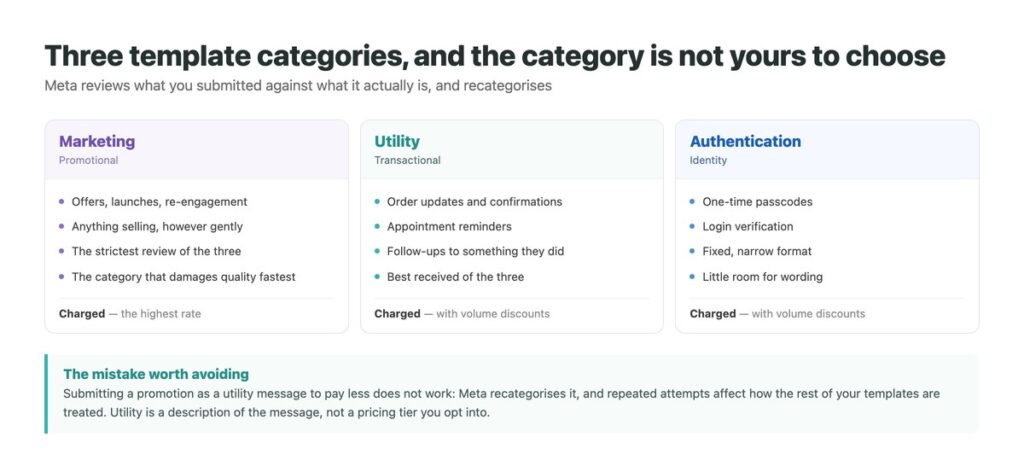
Every template is marketing, utility or authentication. Marketing covers anything promotional. Utility covers transactional messages tied to something the customer did – order updates, confirmations, reminders. Authentication covers one-time codes and login verification.
You submit a category, but Meta reviews whether it matches the content and recategorises when it does not. This is worth stating plainly because the pricing difference makes the temptation obvious: marketing costs more, so a promotion submitted as a utility message looks like a saving.
It is not one. The template gets recategorised or rejected, and doing it repeatedly affects how the rest of your templates are treated. Utility is a description of what the message is, not a rate you opt into.

How Review Actually Works
Meta’s documentation describes it simply: templates are automatically reviewed on creation or after editing, and review can take up to 24 hours. Once the status reads approved, the template can be used.
The detail people trip over is the words after editing. Changing an approved template – fixing a typo, adjusting a line – sends it back through review, and it cannot be sent in the meantime. For a template underpinning a daily operational message, that is an outage rather than an edit.
The practical habit is to create a new template rather than edit a working one, switch to it when it is approved, and retire the old one afterwards. It costs nothing and removes the gap entirely.
The Statuses a Template Moves Through
Only the first two are part of the process people plan for.
| Status | What it means | What causes it |
|---|---|---|
| In review | Not yet sendable | Creation, or any edit |
| Approved | Ready to send | Passing review |
| Rejected | Will not send | Failing review or policy |
| Paused | Temporarily stops sending | Poor feedback or low engagement |
| Disabled | Permanently finished | Recurring negative feedback |
| Appeal requested | Under a second look | You disputed a decision |
The Afterlife Nobody Plans For
A template’s status is set initially by review and then keeps moving based on usage and quality feedback. That sentence is the whole of what most guides leave out.
Poor customer feedback or low engagement pauses a template. Recurring negative feedback disables it permanently. Neither requires you to have changed anything – the status reflects how recipients respond, so a template can be approved in March, work perfectly, and be paused in June because the audience it is now being sent to reacts differently to the one it started with.
This is why the template that quietly stopped working was usually never edited. If a scheduled message stops arriving and nothing in your system changed, the template status is the first thing to check rather than the last.

Writing Templates That Survive
Quality feedback is the thing that decides a template’s lifespan, and these are what protect it.
Send utility before marketing on a new number
Operational messages are welcomed and build the quality history that promotional ones later draw on. Reversing the order is how new numbers get into trouble early.
Make the first line explain why they are hearing from you
Most blocks come from people who do not remember opting in. Naming the reason costs a sentence and prevents the reaction that ends templates.
Give an obvious way to stop
Someone who cannot leave blocks you instead, and blocks are exactly what pauses and disables templates.
Create new rather than edit
Editing sends an approved template back into review and it cannot send meanwhile. Build the replacement, switch when approved, retire the old one.
Check status before blaming the integration
When a scheduled send stops, a paused template looks identical to a broken workflow. It takes ten seconds to rule out and is frequently the answer.
Why Templates Get Rejected or Paused
Rejection happens at review; pausing happens later and for different reasons.
| What happened | When | Usually because |
|---|---|---|
| Rejected | At review | Wrong category, or policy content |
| Recategorised | At review | Submitted as utility, reads as marketing |
| Paused | After approval | Recipients blocking or reporting it |
| Paused | After approval | Low engagement – nobody responds |
| Disabled | After repeated pauses | The pattern continued |
| Stopped sending, status fine | Any time | You hit your messaging tier, not a template issue |
Templates and the Rest of the System
Templates interact with two other limits and it is worth holding all three in mind together. Sending one to somebody outside an open conversation consumes one of your daily unique-customer slots, so template volume is capped by your messaging tier. And template quality feeds the portfolio quality rating that decides whether that tier ever rises.
The consequence is that a single badly received marketing template does more damage than its own pause. It drags the rating that governs every other template you run, including the operational ones customers were entirely happy to receive.
Which argues for treating marketing and utility sends as separate programmes with separate pacing, rather than as one calendar. The operational messages are the ones that quietly earn the reach – and the ones you least want to lose. If several people are sending from the same number, keeping that separation visible is easier in a shared inbox than in a spreadsheet.
The Messages That Need No Template
Everything inside an open conversation is free-form, free of charge, and outside all of this. No template, no review, no category and no pause – just a reply to someone who wrote to you.
DMpro makes that half work properly: first replies on arrival across WhatsApp, Instagram and TikTok, one history per customer, and handover to a person without the customer repeating themselves.
- Free-form replies inside the window, where no template applies
- Instant first response so the window stays open
- WhatsApp, Instagram and TikTok in one inbox
- History that follows the customer between channels
- Routing so the conversations needing a person reach one
- The unrestricted half of messaging is handled well
- Conversations stay open because replies are fast
- Nothing waits because it arrived out of hours
- It cannot get a template approved or un-paused – only Meta does that
Conclusion
Templates are the permission structure for messaging someone who is not currently talking to you, in three categories that Meta assigns rather than accepts. Review is automatic and takes up to a day, and editing an approved template puts it back in the queue.
The part that matters most comes after approval. Poor feedback pauses a template; repeated negative feedback disables it permanently, and neither requires you to have changed a word. A template that silently stopped working was usually never touched.
So when a scheduled message stops arriving, check the template status before the integration – and remember the impostor: hitting your messaging tier looks exactly the same from the outside.
Fast, free-form replies inside the window, across every channel.
See how replies work