
WhatsApp, Instagram, Messenger and Telegram have all shipped message translation, and the word covers four different things. On three of them it is something the person reading taps for themselves, which means it does precisely nothing for the half of the conversation you are writing. On one of them a business can switch it on for both sides.
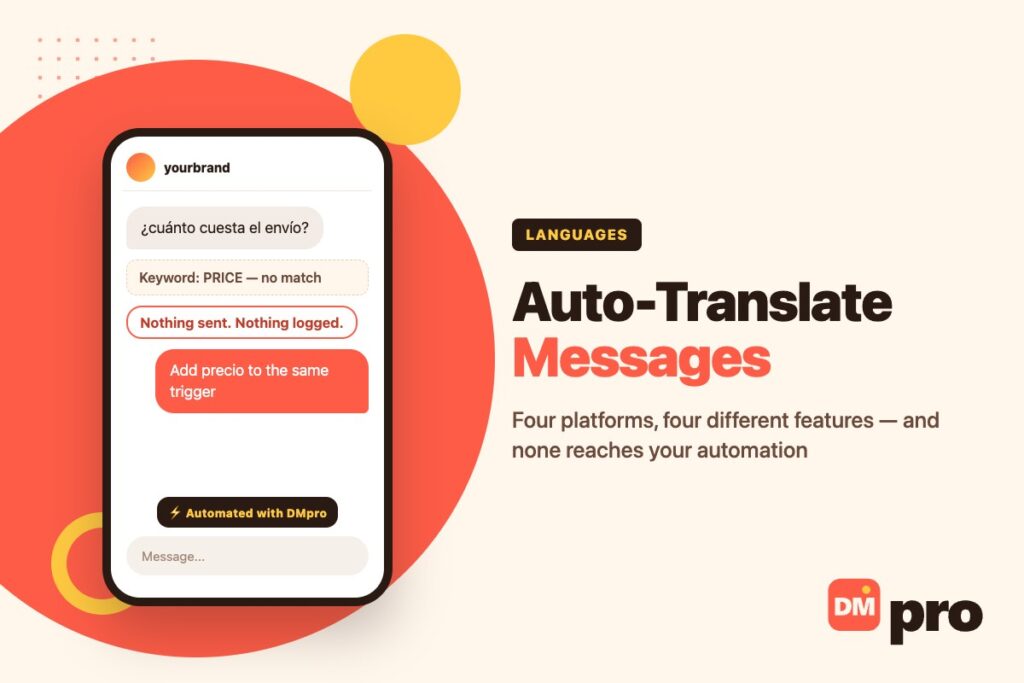
There is a second gap that almost nobody mentions, and for anyone running an automated inbox it is the expensive one. Translation happens in the app, at the moment somebody reads. Your automation sits underneath that, matching literal strings. A customer who types precio at a keyword set built around PRICE triggers nothing at all – and nothing is logged as a failure, because by the automation’s reckoning nothing failed.
Here is what each platform actually does, where your text goes when it is translated, and how to run a multilingual inbox without translating anything.
Key Takeaways
Four Features Sharing a Name
Worth going through one at a time, because the differences decide whether the feature is any use to a business at all.
WhatsApp Translates on the Phone
WhatsApp added message translations in September 2025. Long-press a message, tap Translate, choose the language and download it once – after that it is saved. It works in one-to-one chats, in groups and on Channel updates.
Two details separate it from the rest. Translation happens on your device, and WhatsApp states it cannot see the result. And only Android can turn on automatic translation for an entire thread, so every incoming message in that conversation is translated from then on.
It launched narrow
Six languages on Android – English, Spanish, Hindi, Portuguese, Russian and Arabic – against 19 or more on iPhone. If a language is missing on your side, the button does not help.
The download is the catch
Each language pack has to be fetched before it works. Offline, or on a new phone, the first translation needs a connection.
It is still the reader’s action
Nothing about it translates what you type. Your customer sees your words in your language unless they tap.
Instagram Puts It Under the Message
Instagram brought translation to DMs in February 2025. Hold down a message you sent or received and tap Translate; the translation appears beneath the original rather than replacing it, which is the better design – you can see both.
It is a phone feature. The desktop web version does not have it, which matters if your team answers from a computer. Captions, comments and profile bios are a separate system that translates automatically based on the reader’s language settings, and reels have Meta AI dubbing in a short list of languages.
Messenger Is the Only Business One
This is the feature worth knowing about if you sell on Meta. Messenger documents that a business can turn on automatic translation for a conversation, and it runs in both directions – your Spanish goes to them in English, their English comes to you in Spanish.
The customer is told. A line appears in the chat reading that the business has turned on automatic translations, and another when it is turned off. That disclosure is the right call and it is worth knowing it happens, because a customer who sees it will understand why your phrasing reads slightly flat.
Only some languages
Messenger says so plainly and does not publish the list. Check it on a real conversation rather than assuming your market is covered.
It changes what you should write
Short sentences and no idiom. Anything clever translates badly and you will not see the output.
Consumer Messenger is separate
Translating a message you received is a different feature, and it is not available on computers.
Telegram Charges for the Live Version
Anyone can translate a single message on Telegram once Translation services are enabled under Settings and Languages. Real-time translation of a whole chat, group or channel is a Telegram Premium feature.
Telegram also lets a user switch translation off for their own account entirely, which is unusual – on the other platforms the reader simply does not tap the button.

Where Your Text Actually Goes
Easy to skip, and the one part of this subject with a genuine difference between the platforms rather than a cosmetic one.
WhatsApp Says On-Device
WhatsApp’s own announcement is explicit: translations were designed to protect the privacy of chats, and they occur on your device where WhatsApp cannot see them. That is why the language pack has to be downloaded – the model runs locally rather than sending your message anywhere.
It is consistent with how the rest of the app is built, and it is the strongest privacy position of the four.
Telegram Says Google or Microsoft
Telegram’s privacy policy states that it may rely on Google or Microsoft for automatic translation, and that the text of any message a user chooses to translate may be shared with them to obtain the translated version. It adds that those companies access the data only to provide the translation and do not use it for other products or advertising.
That is honest disclosure rather than a scandal, and it is still a material difference. If a customer sends you an address, an order number or anything regulated and somebody taps Translate, that text has left Telegram.
What This Means for a Business Inbox
You do not control which of these your customer uses, and you cannot tell when they have. The practical conclusion is unglamorous: write in a way that does not need translating where you can, and do not treat an in-app translation as a confidential channel.
If several people answer one number, the question compounds – our guide to running a WhatsApp team inbox covers who sees what once more than one person is in the conversation.
The Gap Under All of It
Everything above describes what happens in the app when a human reads. Automation lives below that layer and none of it applies.
A Keyword Is a Literal String
Keyword automation compares characters. PRICE and precio and prix are three unrelated strings as far as any matcher is concerned, and translating in the app afterwards changes nothing – the match either happened or it did not, long before anyone read anything.
So an inbox automated in one language answers customers in one language, however many translation features the platform has shipped.
The Failure Is Completely Silent
This is why it goes unnoticed for months. An unmatched message does not produce an error, a warning or a line in a report. It produces nothing, which looks identical to a quiet week.
The symptom to watch for is a market where impressions or enquiries exist and conversations do not. If you have customers in a country and almost no automated replies going there, check the keywords before concluding the market is cold.
Accents and Spelling Make It Worse
People type precio, PRECIO and versions with and without accents, and a matcher may treat them as different. Whatever your tool does about case and diacritics, the reliable approach is to add the variants you actually receive rather than the dictionary spelling.
The same applies to the words themselves. Customers do not use the word you chose – they use three or four, and you learn which by reading the inbox.
Does an AI Reply Solve It?
Partly, and not everywhere. An AI step that reads the message can usually answer in the language it was written in, which sidesteps keyword matching altogether.
But it is not available on every channel – ours is not wired for WhatsApp, for instance – and it costs more per conversation than a keyword match. The usual right answer is keywords for the questions you can predict and a person or an AI step for the rest, which is the structure described in our guide to DM chatbots.

A Multilingual Inbox Without Translating Anything
Six steps, and none of them involves a translation feature. That is the point.
Find out which languages you actually receive
Read a month of the inbox before designing anything. Most businesses have one or two second languages, not twelve, and guessing produces work nobody needed.
List the keywords per language, not the translations
Put price, precio, prix and preis on the same trigger. You are not translating the keyword, you are listing what people type – including misspellings and the version without the accent.
Have the reply written, not machine-translated
A wrong automatic translation in a saved reply repeats itself to every customer who triggers it. Pay somebody who speaks the language for the ten messages that matter, once.
Branch so each language gets its own reply
One trigger, several paths. The Spanish keyword leads to the Spanish text. Collapsing them into one bilingual message reads as neither.
Send the unmatched to a person
This is the step that stops silence. Anything that matches nothing should reach a human rather than falling through, which also shows you the vocabulary to add next.
On Messenger, consider turning translation on
It is the only platform where the business controls it, it works in both directions, and the customer is told. For a conversation already going badly across a language gap, it is better than guessing.
Which Approach Fits Which Situation
Sorted by what you are actually trying to do, because the features are not interchangeable.
| Situation | What works | What does not |
|---|---|---|
| A customer writes in a language you do not read | Tap Translate in the app; on Messenger, turn on automatic translation | Expecting your automation to have handled it already |
| You want your replies read in their language | Write them in that language, or use Messenger’s two-way translation | In-app translation – the reader has to tap, and may not |
| Your automation misses a whole market | Add that language’s keywords to the existing triggers | Translating the reply text, which was never the blocker |
| You cannot predict what they will ask | An AI step where the channel supports it, then a person | A longer keyword list – you will always be behind |
| The conversation involves sensitive detail | Keep it in the platform, avoid third-party translation | Assuming every app translates on-device – only WhatsApp claims it |
Nothing in that table is a translation product. The useful work is in the keyword list and in who the unmatched messages reach.
How DMpro Handles Languages
Stated plainly, including the part we do not do, because the whole article is about that distinction.
We Do Not Translate Messages
DMpro does not translate incoming or outgoing messages, and no page of ours should suggest otherwise. If a customer writes in a language you do not read, the translation is still the one in your app.
What it does is let one automation be multilingual – several keywords on a trigger, branching to replies you have written in each language, with everything unmatched routed to a person rather than ignored. That is the thing that actually fixes a silent market.
Building It Once
A single flow carries price, precio and prix on the same trigger and sends a different written reply down each path. Flows can wait for the answer, branch again, and cap how often somebody is contacted, so a second language does not mean a second automation to maintain.
The per-channel guides cover the limits that differ: WhatsApp Business auto reply, Instagram auto reply, Messenger auto reply and Telegram auto reply.
Outbound Is a Different Question
If you are the one starting the conversation, the language is yours to choose before you send – there is nothing to translate. contactID writes the ask in the recipient’s language when it generates a pitch, which is generation rather than translation, and the DMpro Chrome extension generates Instagram DMs from a prompt you write in whatever language you want.
Both are the outbound products. Neither reads an incoming message and converts it.
A Market Can Look Cold When It Is Only Unmatched
Customers in a country, enquiries arriving, and almost no automated replies going out to them. Nothing is broken and nothing is logged – the keywords were written in one language and the questions arrive in another.
DMpro puts every language on the same trigger, sends the reply you wrote for each, and hands anything it does not recognise to a person instead of letting it fall into silence.
- Several keywords per trigger, across languages
- A separate written reply down each branch
- Unmatched messages routed to a person, never dropped
- The same flows on WhatsApp, Instagram, Messenger, Telegram and TikTok
- Official platform connections – no password shared
- A second language is a branch, not a second automation
- Replies are written by someone, not machine-translated
- Nothing matched is nothing lost – it reaches a human
- It does not translate messages, in either direction
- AI replies are not available on every channel
Conclusion
The short version is that four platforms shipped a feature with one name and only Messenger’s version is something a business can act on. The other three wait for your customer to press and hold, which may never happen and is invisible to you when it does.
Underneath, none of it touches automation. A keyword matches characters, so a question asked in another language does not fail – it simply never happens, which is why this is usually discovered a quarter late.
Which makes the fix clerical rather than technical. Read the inbox, list the words people actually type in each language you sell in, pay somebody who speaks it to write the replies once, and make sure the unmatched reach a person. No translation feature required.
Multilingual keyword triggers with replies you wrote. Free plan to start.
Start free