
Comment on this post and I will DM you the link – the format is everywhere now, and the tools that run it are sold on how simple they are to switch on. Most of that simplicity is real. What gets left out is the set of limits Meta puts around the mechanic, and those limits decide whether a campaign works.
The mechanic has an official name, private replies, and it is documented rather than a loophole. Reading the documentation is worth doing before designing anything around it, because three of the constraints change how you would write the message and one of them explains why campaigns underperform for reasons that have nothing to do with the copy.
None of this makes it a bad tactic – it is one of the few things on Instagram that still reliably converts attention into a conversation. It just rewards knowing the rules first. It sits inside the broader question of using DMs as a marketing channel, where the same constraints keep reappearing.
Key Takeaways
What the Mechanic Actually Is
When someone comments on your post, Meta lets your business account send that person one direct message in response. That is a private reply, and it is the entire basis of every comment-to-DM tool on the market.
It is not the same thing as a general auto-responder. A private reply is tied to a specific comment on a specific post, it is initiated by you rather than by the person messaging you, and it operates under its own rules rather than the ones that govern an ordinary conversation. Broader automatic messaging, of the kind covered in our guide to automated Instagram DMs, works differently and has different limits.
It also is not something you can enable from the Instagram app. It runs through the Instagram Messaging API, which is why every implementation involves a third-party tool sitting between your account and Meta.
You Get One Message. That Is the Whole Budget.
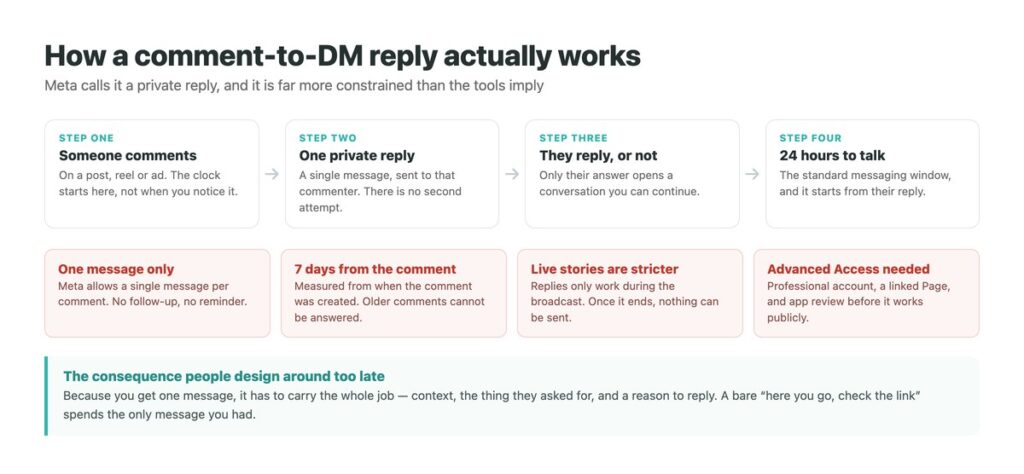
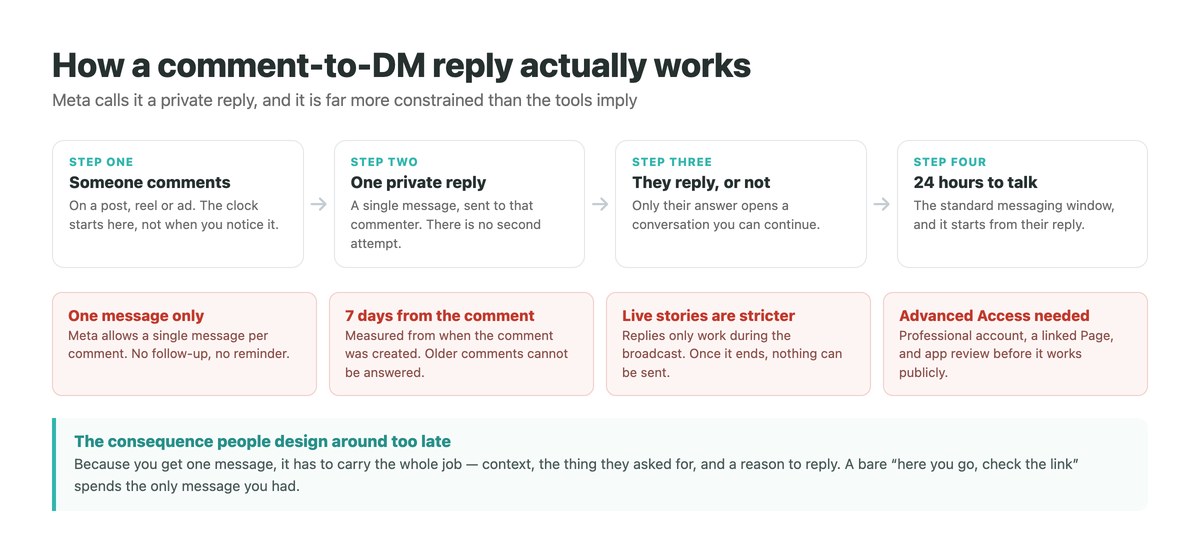
Meta’s documentation is unambiguous about it: only one message can be sent to the person who commented. Not a sequence, not a reminder two days later, not a second attempt if the first goes unanswered.
This is the constraint that most changes how you should write. A message that says nothing but here is the link has spent the only opportunity you had. The one message has to do the whole job at once – acknowledge what they asked for, deliver it, and give them a concrete reason to reply, because their reply is the only thing that opens a real conversation.
It also means the trigger word matters less than people think. Getting more comments raises the number of single messages you may send; it does nothing about what happens after each one.
The Limits, and What Each One Changes
Every row here is a documented rule rather than a platform quirk, and each has a practical consequence.
| The rule | What it means in practice | What to do about it |
|---|---|---|
| One reply per comment | No follow-up of any kind | Make the single message self-contained |
| 7 days from the comment | Old comments cannot be answered at all | Automate it; manual sending misses the window |
| Live stories: during the broadcast only | Nothing can be sent once it ends | Treat live as a separate, shorter opportunity |
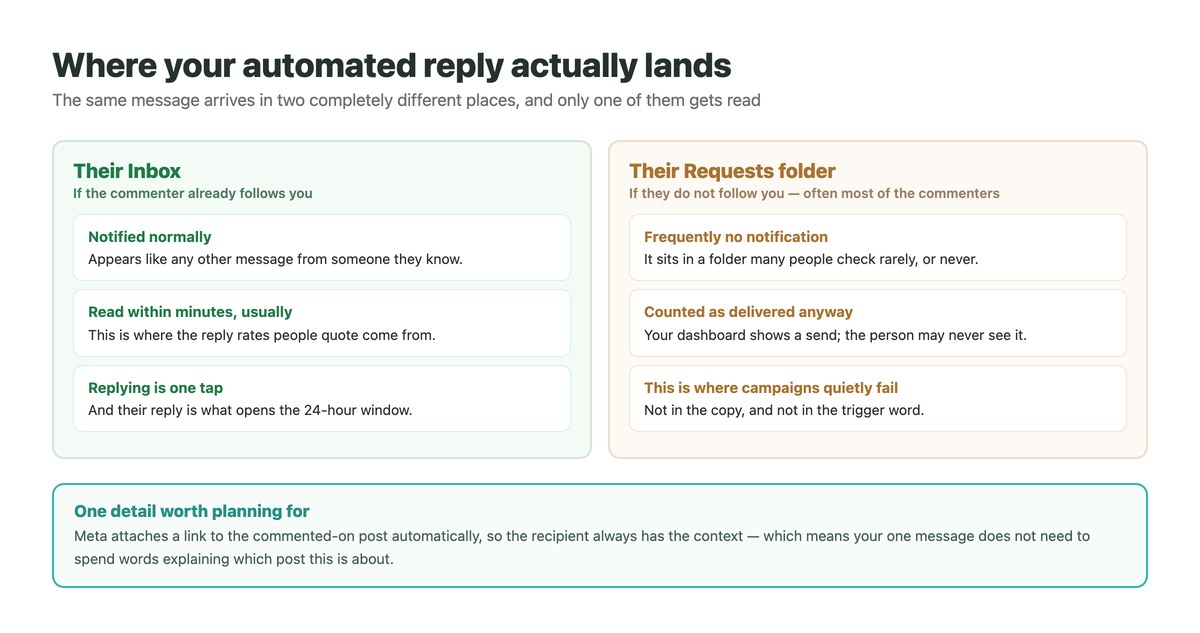
| A post link is attached automatically | They always have the context | Do not spend words explaining which post |
| 24-hour window opens on their reply | Silence closes the door | Write something that invites an answer |
Where Your Message Actually Lands
This is the part that is almost never mentioned, and it decides the result more than anything else on this page.
Meta places the private reply in the recipient’s ordinary inbox if they already follow you, and in their message Requests folder if they do not. Those are two very different outcomes. The inbox produces a notification and gets read. The Requests folder is a place many people check rarely and some have never opened – and how Instagram filters message requests means a message can sit there without ever producing an alert.
The consequence is uncomfortable but useful: the reply rates quoted for this tactic come disproportionately from existing followers. If a post reaches well beyond your audience, a large share of the commenters are strangers, and a large share of your automated replies are landing somewhere quiet. Your dashboard will still report them as delivered.
Setting It Up Without Surprises
The technical requirements are the part people discover halfway through, so they are worth knowing at the start.
Convert to a professional account and link a Page
Meta requires an Instagram professional account connected to a Facebook Page. A personal account cannot use private replies at all, regardless of which tool you sign up for.
Check what access the tool actually has
The permissions involved are approved through Meta’s app review. A tool that has not been granted Advanced Access can only work with people who have a role on its app, which is fine in testing and useless in public.
Decide the trigger, then write for one shot
Pick a keyword that people will type without prompting, then write the reply as a complete message rather than a delivery note. It is the only one you get.
Assume the Requests folder for non-followers
Ask for the reply explicitly. Their answer is what moves the conversation into a normal thread and starts the 24-hour window.
Watch replies rather than sends
A send count measures your tool. A reply count measures whether the campaign did anything. If you are also putting links in DMs, track which ones actually get opened.
The 24 Hours That Follow, and What Ends Them
Once the person answers your private reply, you are in an ordinary conversation governed by the standard messaging window: 24 hours in which you can reply freely.
That window exists to keep messaging conversational rather than promotional, and it resets each time they write again. If they go quiet, it closes, and reopening it is not something a tool can do for you – it needs the person to start talking again.
For anything with a sales motion attached, this argues for handling the conversation properly rather than dropping people into a sequence. What converts in that window is a real exchange, which is the same conclusion our notes on DM outreach keep arriving at from the other direction.
Why Campaigns Underperform, in Order of How Common It Is
Ranked by what actually goes wrong, rather than by what gets blamed.
| What people blame | What is usually happening | The fix |
|---|---|---|
| The trigger keyword | Most replies are sitting in Requests | Aim at followers, or ask for a reply explicitly |
| The copy being too long | The single message said too little | Give the message a job beyond delivery |
| Instagram limiting the account | The 7-day window closed on old comments | Automate so nothing waits for a person |
| The tool being broken | Advanced Access was never granted | Check the app’s review status before launching |
| Low intent from the audience | No reason was given to reply | End with a question rather than a link |
A Note on Free Comment-to-DM Tools
Free tools in this category are common, and the honest position is that some are fine. The mechanic runs through Meta’s official API, so a free tool is not automatically an unofficial one the way it would be on WhatsApp.
What to check is not the price but the access. Ask whether the tool holds Advanced Access for the permissions involved, because without it the integration works in testing and quietly fails in public. Ask what happens to the conversation history if you stop paying or the tool disappears.
The category to avoid is anything that offers to send more than one message per comment, or to reach commenters from months ago. Those things are not available through the official API, so a tool offering them is either misdescribing what it does or working outside it – and Instagram’s response to that is the subject of our guide on what gets DM sending restricted.
The Part After the Automated Reply
Automation gets the first message out within seconds, which is the half of this that tools handle well. The half that decides revenue is what happens when someone answers, and that is usually where an inbox full of one-line replies stops being manageable.
DMpro treats the reply as the start rather than the finish. Answers land in a single inbox alongside WhatsApp and TikTok, threads carry their history, and the follow-up is written against what the person actually said rather than pulled from a sequence that ignores it.
- Replies to comment-triggered DMs collected in one inbox
- Full thread history, so the follow-up knows what was already said
- Instagram, WhatsApp and TikTok conversations side by side
- Handover to a person without the customer repeating themselves
- Reply rates tracked rather than send counts
- The conversation continues instead of stopping at delivery
- One place to answer, whichever platform it came from
- Follow-ups written against the actual reply
- It cannot lift Meta’s one-message-per-comment limit – nothing can
Conclusion
Comment to DM is a good tactic held back by four rules that are easy to find and rarely read. One message per comment, seven days from the comment itself, live stories only during the broadcast, and a conversation that only opens when the other person replies.
The rule that costs the most is the one about placement. Replies to people who do not follow you land in Requests, where a great many of them are never seen, and no amount of work on the trigger word changes that.
Write the single message as though it is the only one – because it is – and measure replies rather than sends. Everything else about the tactic follows from those two decisions.
Comment-triggered replies, and everything that follows them, in one inbox.
See it handle the replies