
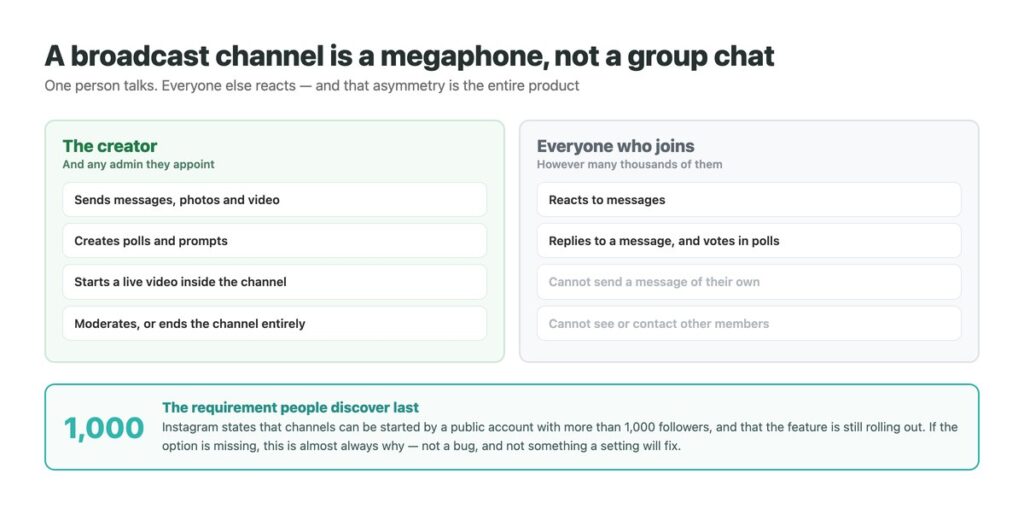
A broadcast channel is Instagram’s one-to-many message thread: the account holder writes, and everyone who joined reads. It looks like a group chat and behaves nothing like one, which is where most of the confusion about it starts.
Two facts decide whether it is worth your attention, and both are stated plainly by Instagram while being almost absent from the coverage. The first is that you need a public account with more than a thousand followers before the option appears at all. The second is that a channel is public in a way your profile settings cannot override.
Neither is a reason to avoid it. Used well it is the least demanding audience channel Instagram has, precisely because nobody can talk back. But both change what you should put in one, and they belong at the start rather than after you have moved an audience there. It sits alongside the other tools in our guide to using DMs as a marketing channel, and pairs with the more conventional business messaging setup.
Key Takeaways
What It Is, and What It Is Not
A broadcast channel sits in your Messages tab, under Channels, and looks like a thread. The resemblance ends there. Only you and any admin you appoint can send into it; everyone else can react to a message, reply to one, and vote in polls you create, but cannot post a message of their own.
It is also not a group chat with the numbers turned up. Members do not see each other, cannot contact each other through it, and are not a community in any sense the feature supports. The asymmetry is the product: it is a way to talk to a large audience without acquiring an inbox to manage.
That makes it a different tool from anything covered in our notes on sending to many people at once, which is about individual messages at volume. A channel is one message in one place, and people come to it.
The Requirement Behind Every Missing Button
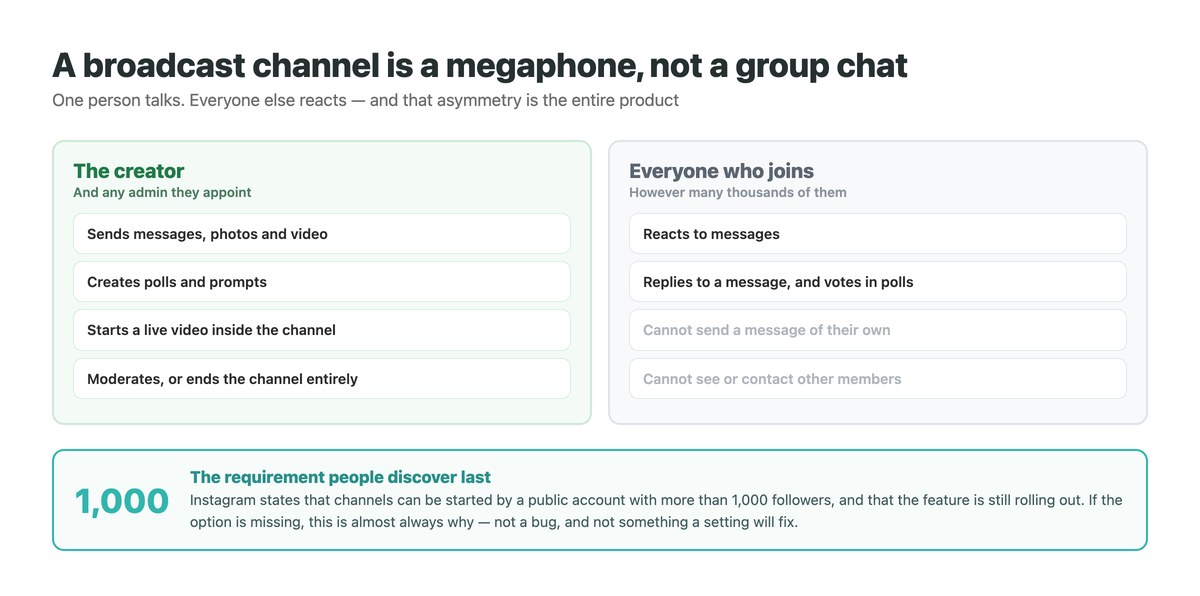
By far the most common question about broadcast channels is why the option is not there, and the answer is not a setting.
Instagram’s own page on creating a channel states it directly: channels can be started by a public account with more than 1,000 followers. It also notes that the feature is still being released gradually and is not available to everyone even among accounts that qualify.
So if Create channel is absent from your Compose menu, work through that in order. A private account will not see it at any follower count. A public account under the threshold will not see it. A public account over the threshold may still be waiting on the rollout, and there is nothing to do about that but wait – no setting, no workaround, and no third-party tool that unlocks it.
Creating One, and the Choices It Asks For
The flow is short, but three of the prompts are decisions rather than formalities.
Open Messages and tap Compose
Messages at the bottom of the app, then the compose icon at the top right. Create channel appears in that menu when your account qualifies.
Name it for what people get, not for yourself
The name is what someone sees when deciding whether to join, and it is visible in search. A name describing the content outperforms one describing you.
Choose the audience
This governs who can join rather than making the channel private. There is no setting anywhere in this flow that makes a channel invisible.
Choose when the channel ends
You can set it to end at a point in the future, which suits a launch, a countdown or an event. A channel meant to run indefinitely is a different commitment from one with a stated end.
Decide whether to show it on your profile
Displaying it on your profile is the main discovery route besides the one-time notification. Leaving it off does not make the channel private – it only makes it harder to find.
Channel, Group Chat or Ordinary DM
The three get compared constantly and they solve different problems.
| Broadcast channel | Group chat | Ordinary DM | |
|---|---|---|---|
| Who can send | You and admins only | Everyone in it | Both people |
| Members see each other | No | Yes | n/a |
| Practical size | Very large | Small by design | One person |
| Discoverable by strangers | Yes, always | No | No |
| Inbox burden | Reactions and replies only | High | One thread |
| Best for | Announcements at scale | A working group | A real conversation |
Public Means Public, Even With a Private Profile
This is the part that surprises people and it is worth being precise about, because it has consequences that are hard to reverse once an audience is in there.
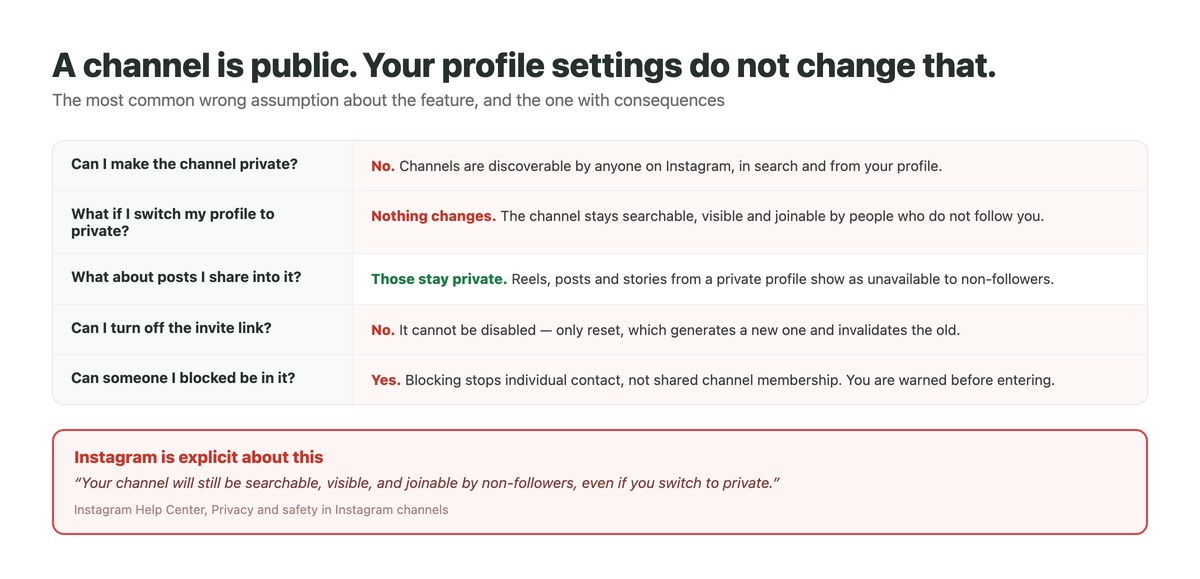
Instagram’s page on channel privacy and safety states that channels are not private, that they can be found and seen by people who are not in them, and that this holds regardless of the creator’s profile privacy setting. The wording leaves no room: your channel will still be searchable, visible, and joinable by non-followers, even if you switch to private.
One thing does stay protected. Reels, posts and stories shared into the channel from a private profile remain restricted to your followers – non-followers see that the content is unavailable. So the container is public while some of the contents are not, which is a strange shape and worth knowing before you assume either extreme.
The Blocking Gap Worth Knowing About
Blocking someone on Instagram stops that account contacting you directly. It does not remove them from a channel you are both in.
Instagram documents this and handles it with a warning rather than a barrier: if you and an account you have blocked are in a channel together, you are notified before you enter it. The choice of whether to continue is left to you.
For a creator running a channel this is worth thinking about in advance, because the people you would rather not hear from can join like anyone else and a public channel gives them a front-row seat. Moderation tools and the ability to end a channel exist for this, and the general controls in our guide to limiting who can message you work on your inbox rather than on a channel.
The Five Ways Someone Joins
Only the first happens automatically, and it happens exactly once.
| Route | How it works | What to know |
|---|---|---|
| The launch notification | Every follower is notified when you send the first message | One-time only. Later messages reach joiners only |
| A link on your profile | Displayed if you chose to show the channel there | The steadiest source of new members |
| The invite link | Shared anywhere you like | Cannot be switched off – only reset |
| A story or sticker | Share the channel, or a message from it, to a story | Good for reviving a quiet channel |
| A QR code | From the channel name at the top of the channel | Useful offline and in print |
What Actually Belongs in One
The format rewards a specific kind of content, and the constraint is the reason. Nobody can reply at length, so anything needing a conversation is in the wrong place. What works is material that is worth receiving but does not ask for anything back: announcements, what you are working on, early access, the reasoning behind a decision, a question answered as a poll.
There is a compliance point that catches creators out. Sharing organic branded content in a channel requires the paid partnership tool to be used to indicate the commercial relationship, under Meta’s branded content policies – and branded content is only available to professional accounts. A sponsored mention dropped casually into a channel is the same disclosure obligation as anywhere else.
Treat it as one channel among several rather than a replacement for the inbox. Reactions and replies still arrive, and if a channel does its job those become conversations you will want somewhere to handle – the argument our notes on treating DMs as a CRM problem make at more length. Channels pair naturally with comment-triggered replies, which do the opposite job: one-to-one, at the moment of interest.
What Comes Back From a Channel
A broadcast channel is deliberately low-maintenance, but it is not silent. Replies and reactions arrive, and the ones worth answering are mixed in with the ones that are not – which is a small problem at a thousand members and a real one at fifty thousand.
DMpro collects what comes back into the same inbox as your Instagram, WhatsApp and TikTok conversations, so a reply from a channel member is not a separate place to check. Routing rules put the ones that matter in front of a person, and the history follows the customer rather than the thread. Telegram, where the channel format started, handles the same problem differently: its business accounts answer automatically on their own, as our guide to Telegram auto reply explains.
- Channel replies handled alongside ordinary DMs, not separately
- Routing rules that surface the replies actually worth answering
- One history per person across Instagram, WhatsApp and TikTok
- Instant first responses when a channel drives people into your DMs
- Team access without sharing the account credentials
- A channel launch does not create an unmanageable inbox
- Replies worth answering stop getting lost among reactions
- The same person is recognisable across channels
- It cannot post into a channel for you – only Instagram’s own app can
Conclusion
Broadcast channels are the cheapest audience tool Instagram offers, for the simple reason that nobody can talk back at length. That makes them excellent for announcements and poor for anything conversational.
Two facts should settle whether it is for you. You need a public account with over a thousand followers and, even then, the rollout may not have reached you. And the channel is public in a way you cannot change – searchable and joinable by strangers regardless of your profile setting, with an invite link you can reset but not disable.
If both of those are acceptable, the first message is the moment that matters most, because the notification to your followers fires once and never again.
Channel replies, DMs and WhatsApp in one inbox, with one history per person.
See how replies are handled