
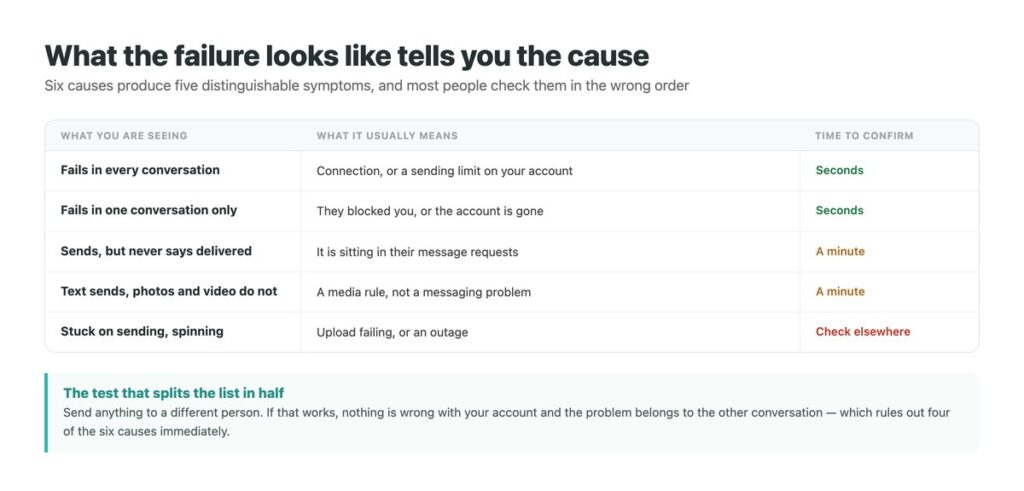
A message that will not send gives you almost nothing to work with. No error worth reading, no reason, and no indication whether the problem is your connection, your account, or the person on the other end.
There are six realistic causes. They are not equally likely and, more usefully, they are not equally quick to eliminate – two of them take a few seconds and settle most cases, which makes the order you check them in worth more than any single fix.
Two of the six are limits Instagram publishes and almost nobody mentions, and both produce failures that look like something else entirely. If the messages are arriving but the app will not show them, that is a different fault covered in our notes on messages that will not load, and the fixes do not overlap. The rest of this sits inside the wider question of keeping on top of Instagram conversations.
Key Takeaways
Start With the Shape of the Failure
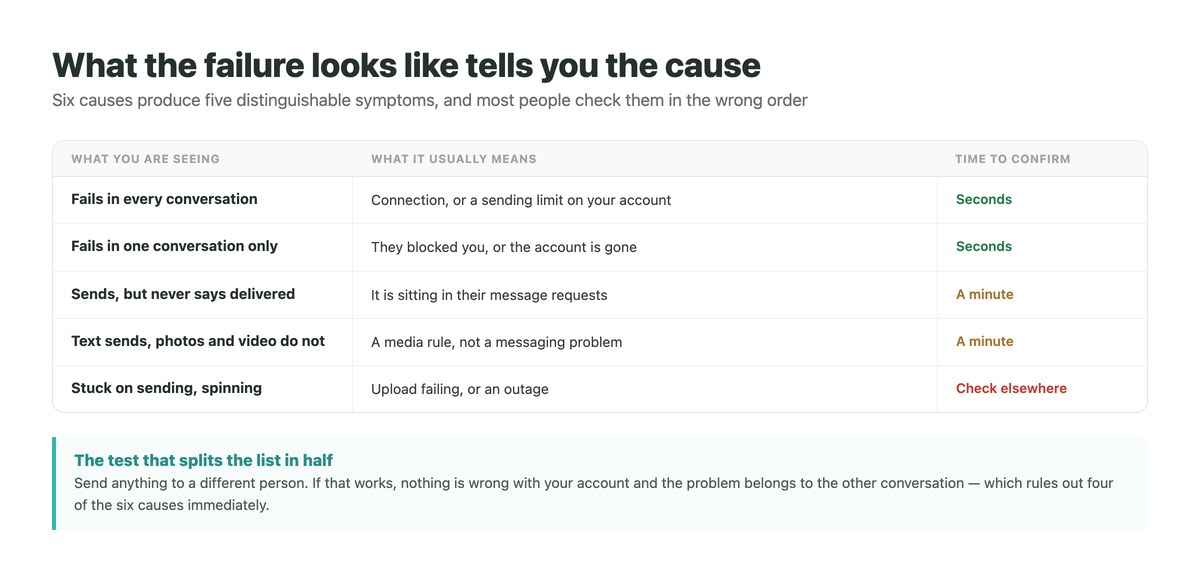
Before changing any setting, notice which of these is happening, because it eliminates most of the list immediately.
Open a different conversation – ideally someone who has messaged you before – and send anything. If it goes through, nothing is wrong with your account or your connection, and the fault belongs to the other conversation. That single test removes four of the six causes.
If it fails there too, the problem is on your side, and the question becomes whether it is the network, the app, or a limit applied to your account. Those are separated below, and they have nothing in common except the symptom.
The Network, and Why It Is Rarely the Answer
It is the first thing everyone suggests and it is worth thirty seconds, not more. Instagram messaging needs very little bandwidth for text, so a connection weak enough to stop a message is usually weak enough to stop the feed loading too.
The exception is media. Photos and video need real upload capacity, and a connection that browses perfectly well can still fail to push a video out – which is the single most common reason text sends and attachments do not.
If text is failing everywhere and the feed loads normally, stop blaming the connection and move down the list. That combination points at the app or at your account, not at the network.
The Six Causes, in the Order Worth Checking
Ordered by how fast each can be ruled out rather than by how common it is.
| # | Cause | How you confirm it | Can you fix it |
|---|---|---|---|
| 1 | Connection or upload | Text works, media does not | Yes |
| 2 | The other account is gone | Their profile will not open | No |
| 3 | You are in their requests | Sends, never shows delivered | No – they must accept |
| 4 | Blocked or restricted | One thread fails, others work | No |
| 5 | A sending limit on your account | Everything fails, no notice | Wait – it lifts on its own |
| 6 | A media or forwarding rule | Only certain content fails | Yes, once you know the rule |
Sent, But Never Delivered
This is the most searched version of the problem and it usually is not a failure at all.
Instagram’s documentation is clear that you can message anyone, but that a message to someone who does not follow you may land as a request in their inbox depending on their settings. A request often produces no notification, so the message can sit unread indefinitely while showing as sent on your side.
Once they accept it, future messages go straight to their inbox and the problem disappears permanently. Until then there is nothing to fix, because nothing is broken – and how the requests folder filters messages explains why some requests are hidden more thoroughly than others.
Blocked, Restricted, or Neither
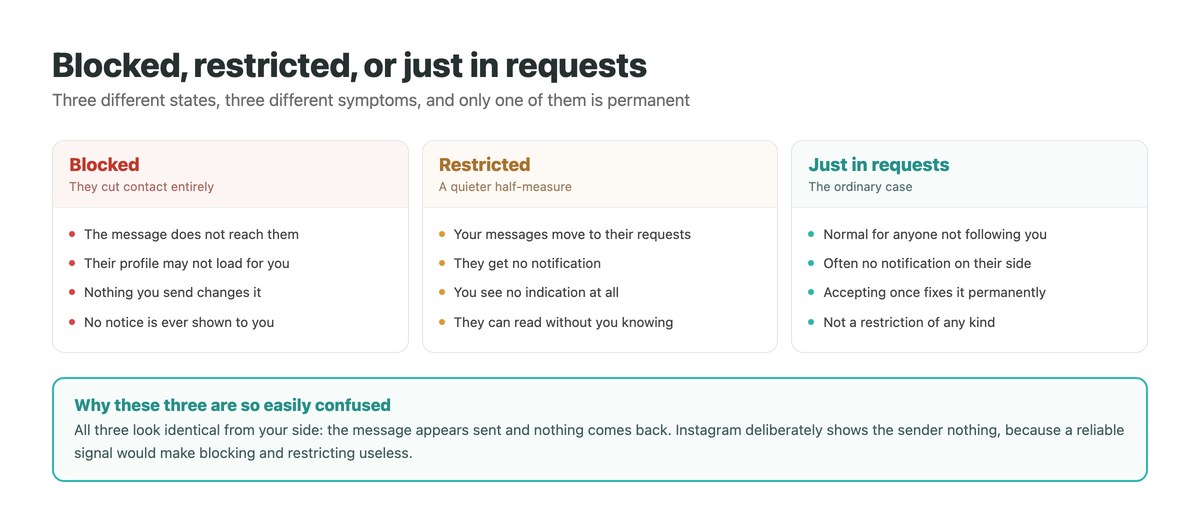
These three states produce an identical experience for the sender, which is deliberate. A reliable way to detect blocking would make blocking useless.
Blocked means the message does not reach them and nothing you do changes that. Restricted is quieter: your messages move into their requests, they get no notification, and they can read without you seeing anything. Neither is announced, and there is no indicator in the app that distinguishes them from an ordinary unaccepted request.
The one weak signal available is whether the failure is confined to that conversation. If everyone else receives your messages normally, the cause is on their side, and the practical answer is the same for all three: nothing to fix, and no message worth sending again. The related question of whether someone declined your request has the same unsatisfying answer for the same reason.
A Sending Limit on Your Account
If nothing sends anywhere and there is no error, the likeliest remaining cause is a limit applied to your account rather than a fault.
Instagram explains that limits exist to stop direct messages people may not want, such as spam, and that if you were warned about sending too many and continued, you may be unable to send for a period of time. The duration is not published, which is why every specific figure circulating about it was invented by someone.
There is nothing to appeal and no setting to change. Stop sending, wait, and resume more slowly – and if this happens regularly rather than once, the pattern behind it is worth understanding, which is the subject of our guide to what actually triggers DM restrictions.
Media That Will Not Send, and Why
When text works and attachments do not, the cause is usually a rule rather than a fault.
| What fails | The likely reason | What to do |
|---|---|---|
| Video, on a good connection | Upload capacity, not download | Try on wi-fi, or send a shorter clip |
| Disappearing photos and video | They only send to followers or accepted senders | Send it as an ordinary photo instead |
| Forwarding to several chats | Instagram caps it at 5 chats at a time | Forward in batches of five |
| Everything, stuck spinning | An upload that never completes, or an outage | Force close, then check whether others report it |
| Photos only | App cache or a permissions problem | Update the app, then check photo permissions |
The Two Rules Most Guides Miss
Both come straight from Instagram’s help pages and both explain failures that otherwise look inexplicable.
The first is that disappearing photos and videos can only be sent to people who follow you or have already approved messages from you. Send one to a stranger and it simply will not go, while an ordinary photo to the same person will. Nothing in the app explains the difference at the moment it happens.
The second is that a message can be forwarded to a maximum of five chats at a time. Beyond that the forward stops working, which reads exactly like a glitch or a shadow restriction if you do not know the number. Neither of these has anything to do with your account standing, and both have a straightforward workaround – which is more than can be said for most of this list. If it is specifically video giving you trouble, our guide to sending video in DMs covers the format side of it.
When the Failure Is Costing You Customers
On a personal account a message that will not send is an irritation. On a business account, the versions of this problem that are not faults – a message sitting unread in requests, an enquiry nobody noticed – are lost revenue that never announces itself.
DMpro reads every conversation into one inbox including the requests folder, so a first message from someone who does not follow you is not something you have to remember to go and look for. First replies go out immediately, and the same history follows the person across Instagram, WhatsApp and TikTok.
- Message requests surfaced alongside the main inbox, not hidden behind it
- Automatic first replies, so nobody waits on you noticing
- Instagram, WhatsApp and TikTok conversations in one place
- History kept on your side, so nothing depends on the app loading
- Sending paced to avoid the limits that cause this in the first place
- Enquiries in requests stop going unread
- A slow reply is no longer the default outcome
- One thread per person rather than one per app
- It cannot deliver a message to someone who has blocked you – nothing can
Conclusion
Six causes, and the order matters more than any individual fix. Message a different person first: if that works, four of the six are gone and the answer is that the other conversation is blocked, restricted, unaccepted or deleted – none of which you can do anything about.
If nothing sends anywhere, look at whether media alone is failing before blaming the network, then consider a sending limit, which lifts by itself and has no appeal.
And keep the two documented rules in mind, because both masquerade as bugs: disappearing photos and video only reach people who follow you or have accepted you, and a forward stops at five chats at a time.
Every conversation in one inbox, with the first reply already sent.
See the unified inbox