
Lists of the sixteen most common Instagram scams go out of date almost as fast as they are written, because the stories are disposable. Whatever is circulating this month will have been replaced by something with a different cover story by the time you have finished memorising it.
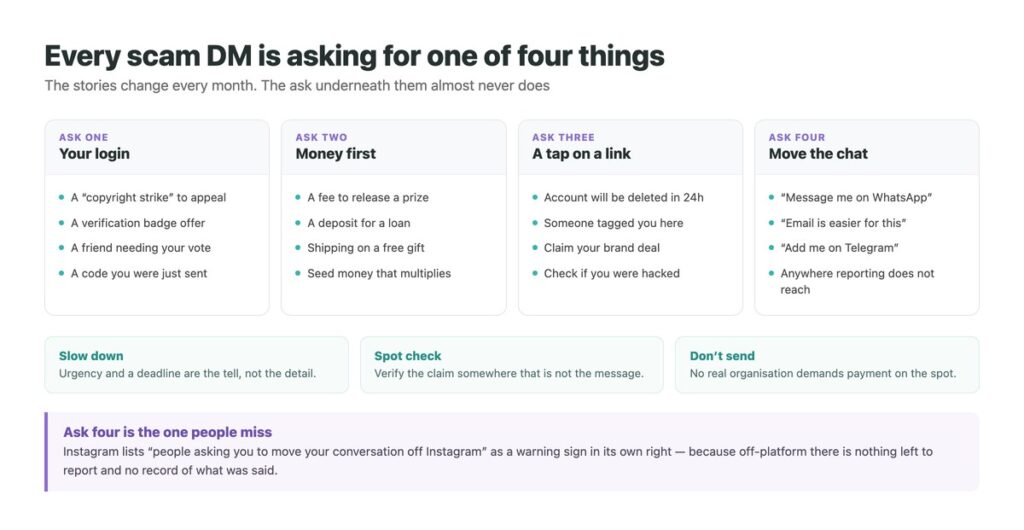
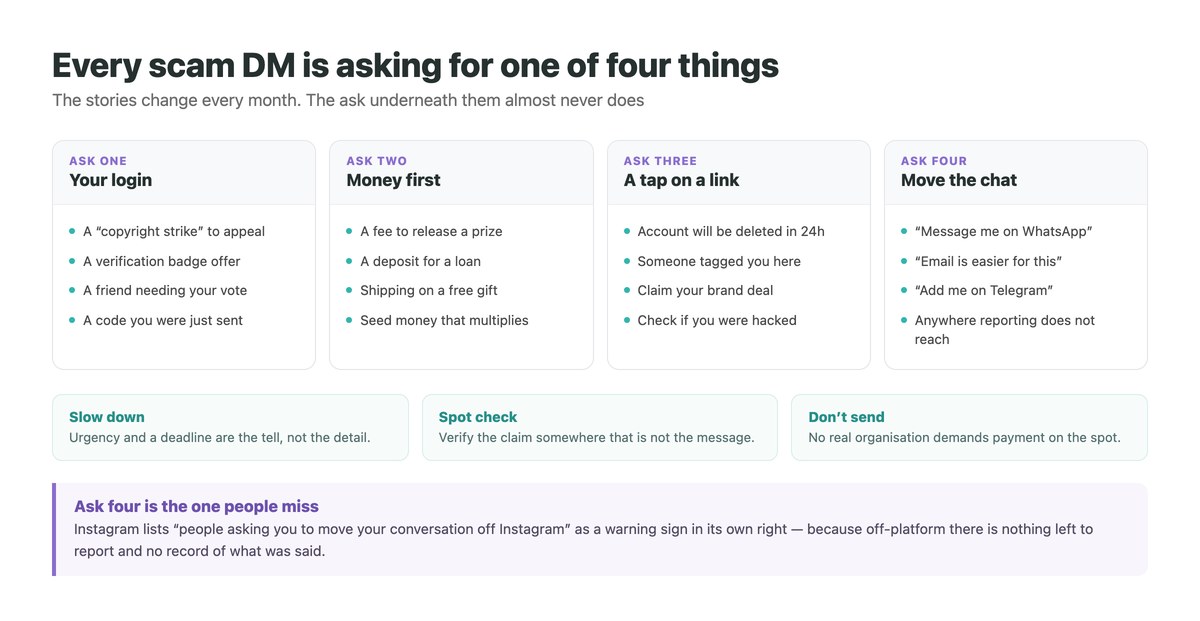
A list of named scams teaches you to recognise wording, and wording is the cheapest thing for a scammer to change. The mechanics underneath are expensive to change, because they are what the scam is for: money has to move, or credentials have to be handed over, or you have to end up somewhere the platform cannot see. So the useful question about a suspicious message is not which scam is this, but what is it asking me to do – and there are only four answers.
Two checks then settle almost everything, and neither requires replying to anything. Both are built into the app, both take under a minute, and one of them rests on a rule that removes an entire category of message at a stroke. If you handle a business inbox, the same instincts are worth building into how you manage Instagram conversations generally.
Key Takeaways
Ask One: Your Login, Wrapped in a Deadline
The most valuable thing in your account is access to it, so a large share of scam DMs are after credentials in some form – a password, a two-factor code, or a tap on a login page that only looks like Instagram’s.
The framing is almost always a threat with a clock on it. A copyright complaint you must appeal in 24 hours. A suspension you can prevent by confirming your details. A verification badge you have somehow been selected for. Urgency exists to stop you doing the thing that would expose it, which is checking.
There is a variant worth naming because it defeats sensible people: the message from an account you actually know, asking you to send back a code you are about to receive, or to vote in a contest. The friend’s account has already been taken, and their contact list is now the tool. It is the mechanism behind most cases of accounts compromised through DMs.
Ask Two: Money That Has to Move First
The second family all share one shape: something valuable is waiting for you, and a smaller payment has to happen before it can be released. A fee to process a prize, a deposit to unlock a loan, shipping on a gift, seed money that supposedly multiplies.
Instagram’s guidance puts it about as plainly as it can be put – no reputable organisation demands payment on the spot. Nothing legitimate requires you to send money in order to receive money, and the request is the whole tell regardless of how the surrounding story is dressed.
The brand-partnership version deserves separate mention because it targets people who have a reason to expect that message. A collaboration offer arrives, the terms are unusually generous, and somewhere in the arrangement you are asked to buy the product first and be reimbursed, or to cover a shipping cost. Real partnerships do not start with the creator paying.
Common Openers and What Each One Actually Wants
Read the right-hand column rather than the left. Different stories, four destinations.
| How it opens | What it wants | Which ask |
|---|---|---|
| “Your account violated copyright, appeal here” | A login on a page that is not Instagram | Your login |
| “You have been selected for verification” | Credentials, or a fee, or both | Your login |
| “I can turn $100 into $1,000” | A payment that never comes back | Money first |
| “You won our giveaway – just cover postage” | A small payment up front | Money first |
| “Is this you in this video?” | A tap on a link | A tap on a link |
| “Message me on WhatsApp, it’s easier” | You, somewhere unreportable | Move the chat |
Ask Three: The Tap
Some messages want nothing from you except a tap, because the page on the other end does the work – a convincing login form, a prompt to install something, or a request for a code.
The bait is usually curiosity or alarm rather than reward. Someone has tagged you in something. There is a video of you. Your account has been accessed from another country. All of these are designed to make the link feel urgent to open rather than worth thinking about.
Instagram’s advice here is unusually specific: if a message claims to be from Instagram, do not tap anything in it, and check inside your settings first. The next section is that check. Messages of this kind often land in the requests folder rather than your main inbox, and how message requests are filtered explains why they sometimes appear without any notification at all.
Ask Four: Somewhere Instagram Cannot See
The fourth ask looks innocent and is the one people wave through. The conversation is going fine and the other person suggests continuing on WhatsApp, Telegram or email – more convenient, they say, or their team prefers it.
Instagram lists this as a warning sign in its own right, and the reasoning is worth understanding rather than just following. On the platform there is a report button, a record of what was said, and an account that can be removed. Off it there is none of that. The move is not a preference; it is the point at which the safety net is removed.
This is not the same as a legitimate business taking a conversation to email later, once you know who they are. The tell is being moved early, before anything has been established, and usually with a reason that sounds helpful.
The Two Checks That Settle It
Both live inside the app and neither involves replying.
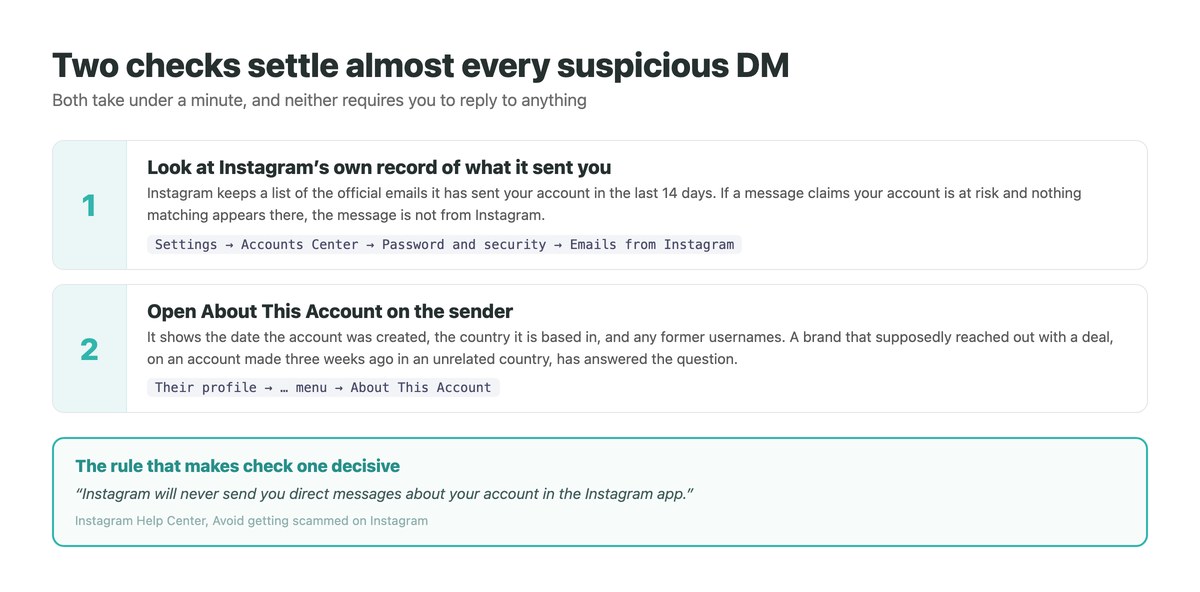
The first rests on a rule from Instagram’s own guidance on scams that is more useful than anything else on the page: Instagram will never send you direct messages about your account in the Instagram app. Not warnings, not appeals, not verification offers. So any DM claiming to be Instagram talking about your account is answered before you read it. The app also keeps a list of the official emails it has sent your account over the last 14 days, under your settings, and if nothing there matches the alarming message you just received, the message invented it.
The second is About This Account, reached from the three dots on any profile. It shows when the account was created, the country it is operating from, and any usernames it used before. A major brand supposedly reaching out with an offer, on an account created five weeks ago in an unrelated country and previously called something else entirely, has told you everything you needed.
That last check carries most of the weight now, because the signals people used to read as legitimacy have all become cheap. A blue tick confirms that someone paid for a subscription rather than that they are who they claim, compromised real accounts keep their badge, and follower counts are purchasable in bulk. Instagram’s own list of warning signs includes accounts with no genuine activity behind them – the visible surface is the easy part to fake. History is not, which is why the creation date and the former usernames are worth more than everything else on the profile put together.
If You Already Replied or Tapped
Order matters here. Securing access comes before anything else, because everything else depends on it.
Change your password from the app, not from a link
Open Instagram yourself and change it in settings. If you entered your password on a page you reached from a message, treat it as taken. Change it anywhere else you used the same one, too.
Turn on two-factor authentication
Instagram calls it one of the most effective defences there is, and it means a stolen password on its own is no longer enough.
Check the list of logged-in sessions
Your settings show where the account is currently signed in. Anything you do not recognise should be removed, and that is also how you find out whether the compromise already happened.
Report the account and the message
Reporting the account gets it looked at beyond your own inbox. Report the message too – they are separate actions and the second is easy to skip.
Warn whoever the message was imitating
If it came from a friend’s account, tell them by some other route. Their account is the thing being used, and they may not know yet.
Report, Block or Restrict
Three buttons, three different outcomes, and people reach for the wrong one regularly.
| Action | What it does | When it is right |
|---|---|---|
| Report | Sends the account or message to Instagram for review | Always, for anything that is actually a scam |
| Block | Cuts contact completely and visibly | Once you have reported and want it gone |
| Restrict | Quietly limits them without their knowing | Someone you know, where blocking would be a statement |
| Delete the chat | Removes your copy only | After reporting – not instead of it |
All four handle the message in front of you. If the real problem is how many keep arriving, the openings are worth narrowing instead: you can cut off messages from people you do not follow or turn direct messages off more broadly if the account does not need to be reachable by strangers. For a business account that is rarely an option, which is where filtering matters more than blocking.
Telling Real Enquiries From the Noise
On a personal account a scam DM is an annoyance. On a business account it is mixed in with genuine enquiries, and the cost of getting it wrong runs both ways: reply to the wrong message and you have a problem, ignore the wrong message and you have lost a customer.
DMpro puts every incoming conversation in one place with its full history kept on your side, so a message that gets deleted later is still there to look at. Routing rules sort first contacts by what they contain, and staff answer through their own access rather than by sharing the account password – which removes one of the ways accounts get taken in the first place.
- Every first message in one inbox instead of a notification list
- Full conversation history retained even if a message is later deleted
- Routing rules that sort new contacts by what they actually say
- Team access without handing round the account password
- Replies that never ask a customer for credentials or payment details
- Real enquiries stop getting lost among junk
- A deleted message is still there when you need to report it
- No shared password between the people answering
- Judging an unusual partnership offer still needs a human read
Conclusion
The taxonomy is what makes this manageable. Four asks – your login, money before money, a tap, or a move off the platform – cover the versions circulating now and the ones that will replace them.
Two checks resolve nearly all of the rest. Instagram does not DM you about your account, and the emails it really did send are listed in your settings. About This Account shows how old the sender is and where it is based, which is the one thing a new fake profile cannot manufacture.
If something already went wrong, the order is password, two-factor, sessions, report – and tell whoever was being impersonated, because their account is the part still being used.
Sort genuine enquiries from the noise across Instagram, WhatsApp and TikTok in one place.
See the shared inbox